Nightmode Messenger
插件截图
插件概述
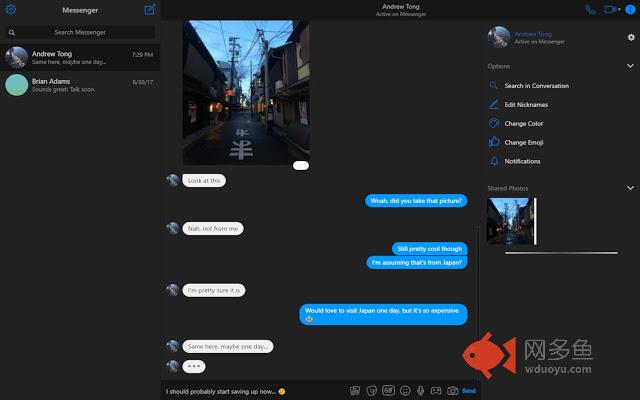
A lightweight Nightmode theme for Facebook Messenger插件详情
A simple, lightweight Chrome extension that enables a nightmode theme for Facebook's Messenger. This is a small side project that I am working on to provide a long-requested feature for Facebook's Messenger. If you notice any issues or would like to request features, please feel free to do so!Please note that the extension only works on Facebook's Messenger domain (i.e. messenger.com) and is not supported in the embedded messenger within Facebook's domain (i.e. facebook.com/messages).
Update Notes:
Version 0.0.2.6
- Update to match Facebook's Messenger facelift (sorry about the delay, just received the update myself!)
- Updated colours on names, icons, reaction backgrounds, and menus
- Fixed border issues and improved hover colours to be clearer in nightmode
Version 0.0.2.5
- Hotfix to received link embed text colour
Version 0.0.2.4
- Visibility update to mentions and links
- Updated search titles/headers
- Fixed single emoji messages (removed chat bubble background)
- Minor updates to vertical and horizontal dividers
- Backend cleanup (removed nonfunctional popup feature - still in development)
Version 0.0.2.3
- Hotfix for reply feature
- Link embeds visual update
- Dividers in main chat window and "Shared Photos" improved
Version 0.0.2.2
- Improved differentiation between read and unread messages for visibility
- Support for Messenger's new "reply" feature
- Viewing images enhanced with translucent background
- Image preview grid colour updated
- Mini-menus (e.g. games, GIF, stickers, etc.) have been updated to support night mode
- Link embeds and previews improved
Special thanks to Marko
其他信息
官方唯一标识:idblamhd****************kjclfhjf
官方最后更新日期:2019年6月24日
分类:社交与通讯
大小:25.81KiB
版本:0.0.2.6
语言:English
提供方:none
星级:5
插件下载
| 下载链接一 下载链接二 |
| Chrome插件离线安装教程 |
温馨提示
本站中的部份内容来源网络和网友发布,纯属个人收集并供大家交流学习参考之用,版权归版权原作者所有。
如果您发现网站上有侵犯您的知识产权的作品,请与我们取得联系,我们会及时修改或删除。
如果您觉得网多鱼对您有帮助,欢迎收藏我们 Ctrl+D。