DownAlbum
插件截图
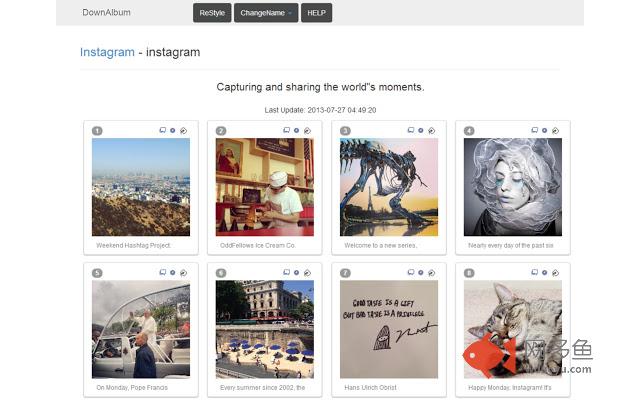
插件概述
Download Facebook (Album & Video), Instagram, Pinterest, Twitter, Ask.fm, Weibo Album.插件详情
●●Please press Ctrl+S & save with "Web Page, Complete" type●●Support: Facebook(Video, Album, Photos of, Tagged photos, Search, Group, Message), Instagram(Photo, Video, Album), Pinterest, Twitter, Ask.fm, Weibo
Support me on Patreon: https://www.patreon.com/wlc
Tutorial links:
Chrome: http://brianmahoney.ca/2013/02/download-facebook-albums/
Firefox: http://goo.gl/crkup
Opera: http://goo.gl/WP02E
https://addons.opera.com/en/extensions/details/download-chrome-extension-9/
(Install this first to install extension version)
------------------------------------------
Userscript Version (For Firefox, Opera, Safari):
https://openuserjs.org/scripts/indream/DownAlbum
https://greasyfork.org/scripts/2180-downalbum
http://userscripts.org:8080/scripts/show/130425
Donate for my work: (Thank you very much!) http://goo.gl/T9gVE
All site permission, is used for download files from facebook & instagram which URLs change over time. Tab permission is used to open a new tab.
Modified from 'Download FB album' by blackbing:
https://chrome.google.com/webstore/detail/blbmhonenddnnmbailokbccgmikhkpni
Credit to fancyBox(by Janis Skarnelis), FileSaver(by Eli Grey), zip.js (by Gildas Lormeau) & File API tool (thecssninja.com)
**Click 'ReStyle' if the images' position are wrong/fancyBox isn't loaded**
Download Steps:
1. Click the Page Actions button in any album/profile
2. Select your option:
●1 -> Normal Download: try to autoload all photos
●2 -> Download without auto load: only output loaded photos( For large album )
●3 -> Load from specific id:
useful when autoload stopped due to error and want to load after the last photo grabbed.
( For very large album to optimize loading speed )
( e.g. 500th -> end not 1st -> end )
www.facebook.com/photo.php?fbid=123456 <- Enter this number
● -- Load Captions, Comments & Friend tag ( Take longer time )
● -- Large Album Optimize ( Save the page as usual )
● -- Compress data ( save more data for option 4 )
Fast: lzw, Extreme: lzma+lzw. Try none/fast if crash occur.
●4 -> Export last album ( may not work for large album )
3. Save the new page opened. ( Press "Ctrl+S" & save with "Web Page, Complete" type )
**ChangeName is used to rename file name to (ascending) order
Steps to change name:
1. Click 'ChangeName'->'Ok' to reverse photo's order
2. 'Auto Zip all' -> Wait & Done! (html is packed inside zip)
OR
3. Save the page with images -> Drag photos you needed
4. Click 'Change Name'
5. 'Zip all files' -> Unzip & Done!
(6. If you want to view generated page offline,save the HTML in zip again to embed the script )
p.s. Please 'Reset' before download another album
---------------------
使用方法:按下地址欄的圖示,會出現以下選項
●1. Normal Download 普通下載 ( 嘗試載入整個相簿的圖片 )
●2. Without auto load 只下載已載入的圖片 ( 針對太多相片的專頁 )
●3. Autoload from specific id 從特定相片後繼續載入 ( 針對非常多相片的專頁/載入大相簿時中斷 )
www.facebook.com/photo.php?fbid=123456 <- 請輸入這個數字
● -Load Captions & Friend tag 載入相片的說明文字, 評論 及 標籤 ( 需等待一段時間 )
● -Large Album Optimize 對大相簿優化 ( 如常儲存網頁便可 )
● -Compress data 壓縮資料 ( 儲存更多資料供選項4使用 )
●4. Export last album 載入上次的相片 ( 減少誤關網頁後的不便 )
按下選項等待載入,然後按Ctrl+S儲存新開的視窗 ( 存檔類型必須為"完整的網頁" )
ChangeName 是用作將檔名按次序排列,使用方法:
1. 按ChangeName,可以選擇將次序倒轉 ( 適用於'手機上載'等 )
2. 'Auto Zip all' 自動下載所有圖片並改名
OR
2. 儲存網頁,選擇需要的圖片
3. 將圖片拖入灰色區域,等候圖片載入
4. Change Name->Zip all files 等候改名->下載
5. 將檔案解壓至一資料夾,網頁檔內包含相片的說明文字
註: 請在下載新相簿前按'Reset'重設
--------------------
Remarks:
1. Memory usage may greatly increase after downloaded too many photos.
2. Slow performance during scroll up&down is normal.
Change log:
0.19.5.1
(Fix) FB load page photos
0.19.4.1
(Fix) Pinterest get title
0.19.3.1 & 0.19.3.2
(Fix) IG new layout & load story
(Fix) Weibo load album
0.19.1.1 (Happy New Year!)
(Fix) FB ajax
(Fix) IG save helper
0.18.12.3
(Fix) FB auto load & ajax
0.18.12.2
(Fix) IG API request header
0.18.12.1
(Fix) IG get username & load stories
0.18.10.3
(Fix) FB handle page id
0.18.10.2
(Fix) FB user album auto load
(Fix) IG save helper for album
0.18.10.1
(Fix) Pinterest & FB search auto load
0.18.8.1
(New) IG load tagged photos
(New) Weibo load all albums
(Fix) FB video helper
(Fix) IG album post link
(Fix) Weibo old API
0.18.6.4
(Fix) IG album post link
0.18.6.1 - 0.18.6.3
(Fix) FB search & own album
(Fix) IG query hash & invalid signature
(Fix) Userscript open new tab
(Fix) Userscript pinterest button
0.18.5.1
(Fix) FB video helper
(Fix) IG ajax
0.18.4.4
(Add) Download IG stories
(Fix) IG gis hash
0.18.4.3
(Fix) IG ajax
0.18.4.2
(Fix) IG 1080x image url
0.18.4.1
(Fix) IG profile image url
(Fix) Pinterest load initial state
0.18.3.2
(Fix) IG image url
0.18.3.1
(Fix) IG graphql
(Fix) IG save helper
(Fix) Export meta
0.18.2.1
(Fix) IG query id
0.18.1.1 & 0.18.1.2 (Happy New Year!)
(New) Support IG user tag (album only)
(New) Support Pinterest board section
(Fix) IG auto load & get full resolution URL
0.17.11.1
(New) Support FB group videos
0.17.10.4
(Fix) IG shortcode redirect
0.17.10.2 & 0.17.10.3
(New) Support FB video album & page videos
(Fix) IG & Weibo error
0.17.10.1
(Fix) FB autoload album
(Fix) IG post link
0.17.9.1
(Mod) Add continue button for IG too many request
(Fix) Ask.fm
0.17.8.3
(Fix) FB photos link
0.17.8.2
(Fix) FB autoload, Ask.fm
0.17.8.1
(New) Pinterest Topic
(Fix) FB profile, Ask.fm, IG save helper
0.17.7.3
(New) IG album helper
(Fix) FB message
0.17.7.2
(New) FB Video helper
(Fix) FB Featured Photos
(Fix) Pinterest & Weibo
0.17.7.1
(Fix) IG get video link
0.17.6.3 - 0.17.6.5
(Fix) IG/FB auto load
0.17.6.1 & 0.17.6.2
(Fix) FB album new layout
(Fix) IG album caption & comments
(Fix) Pinterest language bug
0.17.4.3
(Fix) IG load album
0.17.4.1
(Fix) Pinterest
(Fix) Fb group album
0.17.3.2
(Fix) IG autoload & duplicate photos
0.17.3.1
(New) Support instagram album
(Fix) Fb & Ask.fm autoload
(Fix) Fb end of album
0.17.2.1
(Fix) Fb page posted photos
0.17.1.3
(Fix) Fb message photos
0.17.1.2
(Fix) Pinterest board
0.17.1.1 (Happy New Year!)
(Fix) Fb load page album
其他信息
官方唯一标识:cgjnhhjp****************mgfkppok
官方最后更新日期:2019年5月21日
分类:社交与通讯
大小:172KiB
版本:0.19.5.1
语言:English
提供方:none
星级:4
插件下载
| 下载链接一 下载链接二 |
| Chrome插件离线安装教程 |
温馨提示
本站中的部份内容来源网络和网友发布,纯属个人收集并供大家交流学习参考之用,版权归版权原作者所有。
如果您发现网站上有侵犯您的知识产权的作品,请与我们取得联系,我们会及时修改或删除。
如果您觉得网多鱼对您有帮助,欢迎收藏我们 Ctrl+D。