CryptoData
插件截图
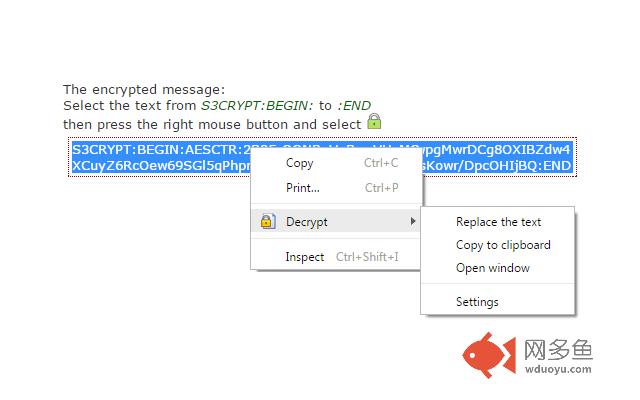
插件概述
Easily and quickly to encrypt / decrypt插件详情
Easily and quickly to encrypt / decrypt:Private messages via e-mail, blogs, social networks, forums, websites, images, etc
This addon allows you to encrypt and decrypt the text: selected or manually entered text, as well as whole site
The encryption process is based on the US military standard Advanced Encryption Standard (AES)
https://en.wikipedia.org/wiki/Advanced_Encryption_Standard
JavaScript implementation (AES CTR) belongs to Chris Veness:
http://www.movable-type.co.uk/scripts/aes.html
All encryption and decryption is performed only on the client side without the involvement of external resources or Web services.
Examples encrypting the selected portion of text and web-site:
http://www.s3blog.org/crypto-data/examples.html
For users:
* Simply select the plain or encrypted text in your web browser, open the context menu by clicking the right mouse button, and you can easily encrypt or decrypt any text.
* There is also a possibility of automatic decryption.
For webmasters:
* With this extension you can encrypt any content on the server, e.g. html, javascript or images.
Even if website uses a secure HTTPS-connection and access to his page requires HTTP-authentication, it does not mean that you are fully protected!
There are many ways to steal your information, for example by using a proxy, sniffer or Trojan horse program (eg such as Zeus)
But when you use addon CryptoData attacker could only get a set of useless characters!
* For convenience webmasters CryptoData sends cookie s3crypt_site_enable = true to the encrypted site. Thus, the site can recognize that the client has CryptoData and it can get the encrypted content.
* An example of the implementation of the encryption algorithm on the server side:
http://www.s3blog.org/crypto-data.html
forums mozillaZine:
http://forums.mozillazine.org/viewtopic.php?t=2902265
其他信息
官方唯一标识:kddnbgkp****************dfghkjjh
官方最后更新日期:2018年11月8日
分类:社交与通讯
大小:91.95KiB
版本:3.6
语言:支持4种语言
提供方:none
星级:4.9
插件下载
| 下载链接一 下载链接二 |
| Chrome插件离线安装教程 |
温馨提示
本站中的部份内容来源网络和网友发布,纯属个人收集并供大家交流学习参考之用,版权归版权原作者所有。
如果您发现网站上有侵犯您的知识产权的作品,请与我们取得联系,我们会及时修改或删除。
如果您觉得网多鱼对您有帮助,欢迎收藏我们 Ctrl+D。