Comment Save
插件截图
插件概述
Keeps tracks of your comments/posts as you type. Allows you to quickly look up the last one you wrote and your history.插件详情
NOTE: If the extension doesn't work for you, please let me know here: http://groups.google.com/group/comment-save and specify the website it's not working on.UPDATE October 2015:
--------------------
I haven't worked on this in a long time, but I might start looking at this again.
Donation link (no obligation!):
------------------------------
https://www.paypal.com/cgi-bin/webscr?cmd=_donations&business=shayanj%40gmail%2ecom&lc=US&item_name=Comment%20Save&item_number=CS¤cy_code=USD&bn=PP%2dDonationsBF%3abtn_donateCC_LG%2egif%3aNonHosted
As featured on Lifehacker!
http://lifehacker.com/5715657/comment-save-keeps-track-of-your-comments-on-the-web
Ever written a large post or comment on a website, click submit, only to see your comment get lost in the internet wilderness? Or your tab/window closed somehow before you could submit?
Or maybe you just like to keep track of all the posts you made on different websites.
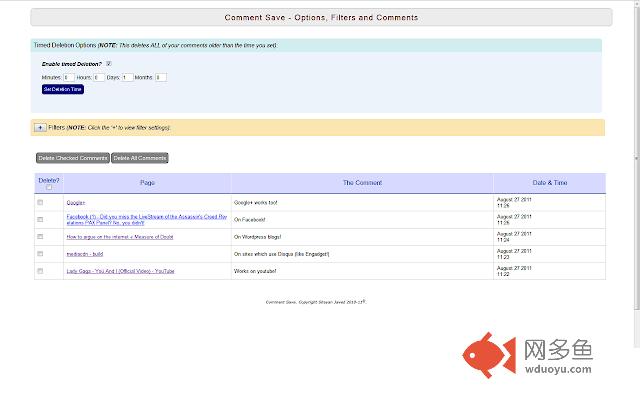
Comment Save (CS) helps you keep track of what you have been writing as you type. Icon beside the address bar brings up a window showing you the last post you wrote alongwith a link to the page. Link in the window allows you to view your post history.
You can also filter websites where you don't want any of your posts to be tracked (or you can have a white list to only record on specific websites).
Works on sites like:
- YouTube
- Facebook/Twitter/Google+
- Gawker blogs (Gawker/Gizmodo/Jezebel/Lifehacker/etc.)
- Engadget/Techcrunch/SlashGear/etc. (Sites which use Disqus/Livefyre)
- Wordpress/Tumblr
- Forums of all kinds
- Digg/Reddit
- CNN/New York Times/The Guardian/other news websites
- And lots more!
FEATURES:
------------------
* Records your post as you type so you can recover it if you lose it.
* Keeps a history of all your posts along with a link to the page and the time.
* Allows you to add filters so you can disable/enable tracking on certain websites.
* Simple checkbox in the popup window enables/disable tracking globally.
* User can set timed-deletion of comments. (Delete comments older than specific minutes, days, hours or months)
NOTES:
-----------
* Refresh any open pages after installation or the extension won't work.
* CS saves all your data locally to your machine. It does NOT save any data online nor does it send any of your data anywhere else. So all your posts are only accessible by you. And it doesn't access your browsing history (as Chrome says it is allowed to).
* Does not save your username/passwords. It only works on multi-line textboxes.
* Saves your email too (for ex. Gmail). If you don't want it to save your email add a filter for that website (mail.google.com and gmail.com)
* Won't work on this page because Google doesn't allow extensions to work here.
UPDATE October 2015:
--------------------
I haven't worked on this in a long time, but I might start looking at this again.
Donation link (no obligation!):
------------------------------
https://www.paypal.com/cgi-bin/webscr?cmd=_donations&business=shayanj%40gmail%2ecom&lc=US&item_name=Comment%20Save&item_number=CS¤cy_code=USD&bn=PP%2dDonationsBF%3abtn_donateCC_LG%2egif%3aNonHosted
CHANGELOG:
--------------------
Version 0.6.x:
--------------------------
-Added white list option (Tracking will only be done on specific websites).
-Can now disable the context menu from the options page.
-Fixed Google+/FB/Disqus
-Added LiveFyre support
Version 0.5:
--------------------------
-Added timed deletion of comments
-Google+ comments/posts are now tracked!
If you have any suggestions or feedback, please let me know here:
http://groups.google.com/group/comment-save
Thanks!
其他信息
官方唯一标识:ndmcbhmm****************hlifmmco
官方最后更新日期:2015年10月9日
分类:社交与通讯
大小:172KiB
版本:0.6.4
语言:English
提供方:none
星级:4.1
插件下载
| 下载链接一 下载链接二 |
| Chrome插件离线安装教程 |
温馨提示
本站中的部份内容来源网络和网友发布,纯属个人收集并供大家交流学习参考之用,版权归版权原作者所有。
如果您发现网站上有侵犯您的知识产权的作品,请与我们取得联系,我们会及时修改或删除。
如果您觉得网多鱼对您有帮助,欢迎收藏我们 Ctrl+D。