Cisco Dialer
插件截图
插件概述
Let your Cisco phone dial a number by the click of a button right within your Google Contacts.插件详情
- - - NEW - - -If you're looking for in-page and context menu dial then try out the beta version here: http://goo.gl/HHM2EP
Please remove or disable the stable version if you want to use the beta!
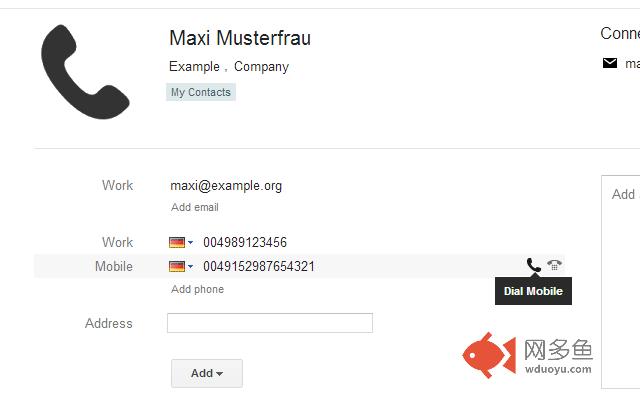
Cisco Dialer adds a little phone icon behind every phone number within your Google Contacts to quickly dial a number on your Cisco based IP phone.
Just open the extension settings and add the address of your phone. Now open Google Mail and select Contacts. Select a contact and hover over a phone entry. You should now see a little phone icon. Click on it and your phone should start dialing the number.
Have Fun!
Tested with the Cisco SPA500 Series IP Phones but should also work on other Cisco IP based phones.
其他信息
官方唯一标识:deelocce****************dmlmoeog
官方最后更新日期:2015年4月11日
分类:社交与通讯
大小:50.16KiB
版本:1.0.6
语言:支持2种语言
提供方:none
星级:4.4
插件下载
| 下载链接一 下载链接二 |
| Chrome插件离线安装教程 |
温馨提示
本站中的部份内容来源网络和网友发布,纯属个人收集并供大家交流学习参考之用,版权归版权原作者所有。
如果您发现网站上有侵犯您的知识产权的作品,请与我们取得联系,我们会及时修改或删除。
如果您觉得网多鱼对您有帮助,欢迎收藏我们 Ctrl+D。