AT&T Connect Google Add-in
插件截图
插件概述
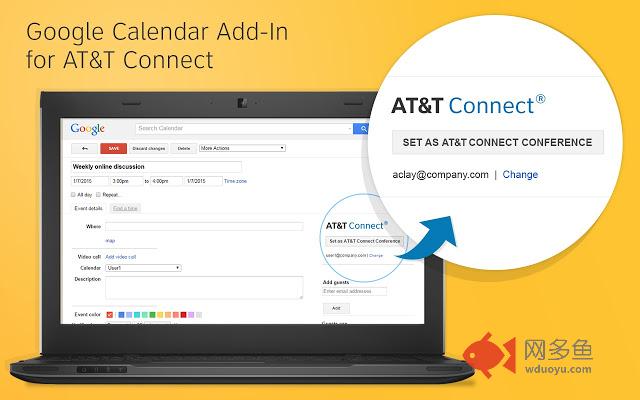
Allow easy scheduling of AT&T Connect Web Conferences from Google Calendar.插件详情
With a single click, turn your Google meetings into AT&T Connect web conferences.Open a conference or create a new one.
Invite participants. Set the date and time. Click the AT&T Connect button and the Save button.
That’s it!
Relevant text and a link to the conference is automatically added to the invitation. A Join button appears to let you easily connect to the conference. A Dial-in Instructions button lets you see the dial-in options even before the conference has started.
Want to remove AT&T Connect from the meeting? Just click on the button again, save and you’re done. All the changes will be reverted.
Don’t have an AT&T Connect account? Create a 30-day free trial account and start using AT&T Connect right now. How? Visit https://trial.uc.att.com/portal/.
All over the world, businesses are open 24/7. Competing in this global, real-time marketplace means collaborating—reaching critical business decisions, resolving issues, and innovating—in the now.
AT&T Connect streamlines real-time conferencing with web, audio, and video in a single, easy-to-use tool. So, connect with the right people at the right time to accelerate your business pace.
Connecting anytime, anywhere with PC, Mac, Android, Win Phone and iOS applications for AT&T Connect.
Licensing information:
Intellectual property: http://www.att.com/gen/privacy-policy?pid=2587
License information: http://www.corp.att.com/attconnectsupport/downloads/licensing/thirdparty.html
其他信息
官方唯一标识:lgghgeco****************ldckanle
官方最后更新日期:2015年11月6日
分类:社交与通讯
大小:253KiB
版本:11.5.214.120
语言:English (United States)
提供方:none
星级:4.3
插件下载
| 下载链接一 下载链接二 |
| Chrome插件离线安装教程 |
温馨提示
本站中的部份内容来源网络和网友发布,纯属个人收集并供大家交流学习参考之用,版权归版权原作者所有。
如果您发现网站上有侵犯您的知识产权的作品,请与我们取得联系,我们会及时修改或删除。
如果您觉得网多鱼对您有帮助,欢迎收藏我们 Ctrl+D。