3CX Click to Call
插件截图
插件概述
Dial numbers directly from your browser or CRM with the 3CX Click to Call extension插件详情
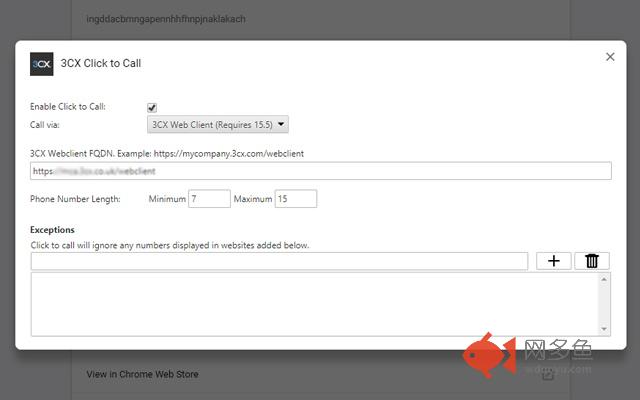
The 3CX Click to Call extension enables users of 3CX to dial numbers directly from their CRM or browser via the 3CX Web Client (Requires 3CX V15.5).It instantly detects phone numbers on websites, customer portals and popular CRM software such as Office 365, SugarCRM, Salesforce and many others. Simply click on a phone number and the call will be made via the 3CX Web Client. This eliminates the need to dial, copy, paste or edit numbers from emails or websites offering instant outbound dialing and increasing productivity and collaboration for 3CX users.
-Automate tedious and time consuming workflow processes for staff
-Boost productivity and increase sales and customer satisfaction
-Works seamlessly with the 3CX Web Client
-Phone Number Detection – Detect All or International Numbers
-Exceptions – Add websites and pages to exclude from searching
-Highlighted Contacts – Numbers are identified with underscore and tooltip
The extension also unlocks some advanced web meeting features such as screen sharing and remote assistance.
其他信息
官方唯一标识:ingddacb****************aklakach
官方最后更新日期:2019年1月7日
分类:社交与通讯
大小:46.55KiB
版本:10.10
语言:English (United States)
提供方:3cx.net
星级:3.8
插件下载
| 下载链接一 下载链接二 |
| Chrome插件离线安装教程 |
温馨提示
本站中的部份内容来源网络和网友发布,纯属个人收集并供大家交流学习参考之用,版权归版权原作者所有。
如果您发现网站上有侵犯您的知识产权的作品,请与我们取得联系,我们会及时修改或删除。
如果您觉得网多鱼对您有帮助,欢迎收藏我们 Ctrl+D。