UnXSS
插件截图
插件概述
Intercept and modify or delete websites' security headers插件详情
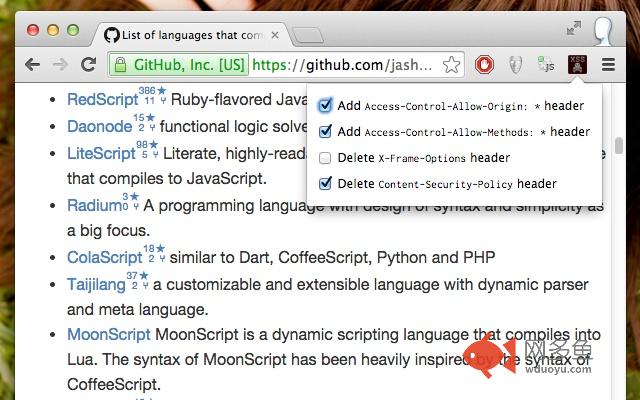
Modify or delete websites' security headers on the fly.• If you want to load a website in an iframe, and that website uses "X-Frame-Options: SAMEORIGIN", Chrome will refuse to show the website. Use the "Delete X-Frame-Options header" option to have Chrome ignore that restriction.
• If you want to call a foreign AJAX endpoint from a website that has "Content-Security-Policy: ..." set to disallow wildcard script-src, use the "Delete Content-Security-Policy header" to allow running any script on that page.
• If you want to call out to an API endpoint that doesn't specify itself as CORS-friendly, enable the "Add Access-Control-Allow-Origin: * header" and "Add Access-Control-Allow-Methods: * header" options.
Each restriction can be disabled or enabled individually, and a list of checkboxes on the configuration page clearly indicates which restrictions are disabled.
Source code: https://github.com/chbrown/chrome-unxss
其他信息
官方唯一标识:cbjmpjkh****************bihgpmge
官方最后更新日期:2015年1月10日
分类:辅助工具
大小:234KiB
版本:0.0.4
语言:English (United States)
提供方:none
星级:5
插件下载
| 下载链接一 下载链接二 |
| Chrome插件离线安装教程 |
温馨提示
本站中的部份内容来源网络和网友发布,纯属个人收集并供大家交流学习参考之用,版权归版权原作者所有。
如果您发现网站上有侵犯您的知识产权的作品,请与我们取得联系,我们会及时修改或删除。
如果您觉得网多鱼对您有帮助,欢迎收藏我们 Ctrl+D。