Tweaks for Google Music
插件截图
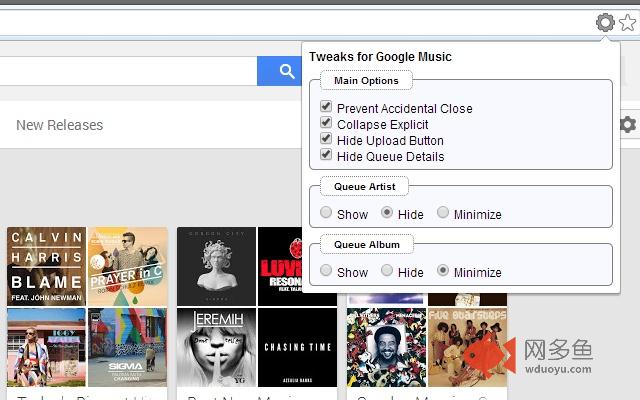
插件概述
Tweaks parts of the UI for Google Music插件详情
[Ad-Free], I don't like ads so I won't bundle them in to extensions.Tweaks the UI of google music to change parts I found slightly annoying.
There is options to turn features on and off.
These will sync through all your instances of chrome if you have sync turned on within chrome itself.
So far the options are:
1) Show/Hide Queue Details (the big banner at the top of the current playing queue). I found this takes up far too much space and adds nothing for me.
2) Show/Hide Upload button. Since you can just drag files directly into the webpage directly, this button taken up valuable space, especially when viewed in tight spaces.
3) Show/Collapse Explicit tag. (The tag that looks like [Explicit] in red. This taken up valuable Track name space. I decided removing it completely might have bad repercussions from Google, so I made it so it can Collapse down to [E] and would display in full on hover.
4) Show/Hide or Minimize artist column within play queue.
To allow more space for Track name. This can be set to be completely invisible or minimized to 10%.
5) Show/Hide or Minimize album column within play queue.
To allow more space for Track name. This can be set to be completely invisible or minimized to 10%.
6) Allow/Prevent accidental close. This is the one that started this entire extension off. When you try to close or refresh the tab/browser, you will sometimes curse yourself as it also closed the music player too. This will now ask for confirmation that you wish to close.
------
If you wish to have any other tweaks added. Let me know and I will see if I can accommodate.
其他信息
官方唯一标识:doochige****************ejcggonj
官方最后更新日期:2015年4月8日
分类:辅助工具
大小:20.25KiB
版本:0.2.6
语言:支持2种语言
提供方:none
星级:4.7
插件下载
| 下载链接一 下载链接二 |
| Chrome插件离线安装教程 |
温馨提示
本站中的部份内容来源网络和网友发布,纯属个人收集并供大家交流学习参考之用,版权归版权原作者所有。
如果您发现网站上有侵犯您的知识产权的作品,请与我们取得联系,我们会及时修改或删除。
如果您觉得网多鱼对您有帮助,欢迎收藏我们 Ctrl+D。