TimeTags for YouTube
插件截图
插件概述
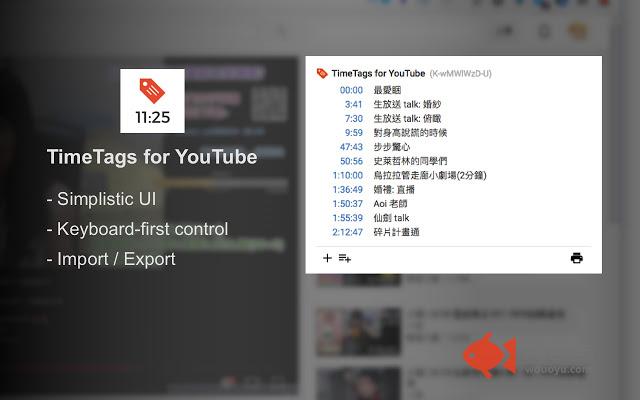
Create YouTube time tags with simple keyboard shortcuts插件详情
We all know that YouTube has a feature that you can tag(bookmark) any specific time of the current video with a video timestamp format like `11:25` in comments.I found that when you try to create lots of tags for a longer-duration video, it's pretty annoying to write down the tag manually (in text editors like notepad). You have to switch back and forth between different apps. And it's even more annoying when you try to ensure the tagged time is accurate and precise.
So I created this extension to help me solve the problem. Now I can pretty much use just keyboard to add and adjust tags right in the YouTube interface.
Feedbacks are welcome.
# Usage
Browse to any YouTube video, click the icon of the extension in browser bar to activate it.
## Shortcuts
- [delete, backspace] remove tag (affects active tag)
- [left] backward 5 seconds (affects active tag)
- [alt+left] backward 1 second (affects active tag)
- [right] forward 5 seconds (affects active tag)
- [alt+right] forward 1 second (affects active tag)
- [space] pause/play
- [a] add a tag at current time
- [/] edit the description of active tag
- [d] edit the description of active tag (for new YouTube design)
- [esc] cancel active tag
Shortcuts won't work when YouTube's bulit-in shortcuts is active (which means your focus is currently on the video element).
## Storage
Tags are currently saved locally in your computer.
## Export/Import
To export, click on the "printer" icon.
Results will be copied to your clipboard, in the format:
```
{tag 1} {description 1}
{tag 2} {description 2}
.
.
{tag N} {description N}
```
To import, click on the button next to "add" button.
Import shares the exact same format with export.
# Changelog
## 1.2.0
- Remove "tabs" permission
- Default to sync storage of Chrome
- Add shortcut for "remove"
- Update for new YouTube design component change
## 1.1.0
- Support new YouTube design
- Tag list will become scrollable when it feels overwhemled
- Add keyboard shortcut `d` for editing active tag description, due to `/` is already used by the new YouTube
## 1.0.0
Add "import" function.
## 0.0.1
First release.
其他信息
官方唯一标识:hpbmedim****************elbnelef
官方最后更新日期:2018年6月26日
分类:辅助工具
大小:116KiB
版本:1.2.0
语言:English
提供方:none
星级:4.4
插件下载
| 下载链接一 下载链接二 |
| Chrome插件离线安装教程 |
温馨提示
本站中的部份内容来源网络和网友发布,纯属个人收集并供大家交流学习参考之用,版权归版权原作者所有。
如果您发现网站上有侵犯您的知识产权的作品,请与我们取得联系,我们会及时修改或删除。
如果您觉得网多鱼对您有帮助,欢迎收藏我们 Ctrl+D。