Smart zoom
插件截图
插件概述
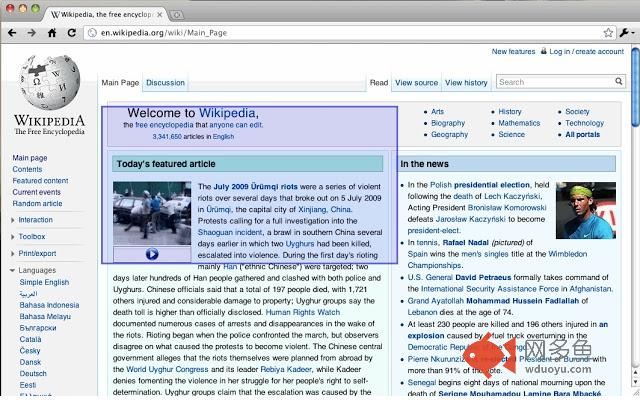
Right-click a column of text so zoom, or tap Shift and click, then press +/-/0 to adjust the font size. Esc unzooms.插件详情
Right-click a column of text and pick "Zoom" to make it take up the whole width of the screen. Esc unzooms.Or you can tap Shift then click a column of text to zoom in on it, and/or press +/-/0 to adjust the font size. If you tap Shift accidentally, cancel zooming by tapping it again (or pressing any other key).
This extension works best for text-heavy sites: news, blogs, and so forth. It won't zoom all content correctly, and it's disabled for some sites like GMail and Hotmail where it doesn't work. Like all extensions, it's disabled on this site, too. And it's experimental: it could cause you problems.
If the keyboard shortcuts interfere with a webpage, you can disable them on a page by pressing ` (the backquote key, underneath Escape on some keyboards).
If you like this extension, take a look at the Readability Redux extension (by different folks), which lets you strip many news/blog sites down to plain text.
Note: This extension was originally published by another author. I loved this extension but it was not maintained any more and it was not worked on recent version of chrome. So I decided to fix it for latest chrome. I really appreciate original authors' efforts.
origin: https://chrome.google.com/webstore/detail/smart-zoom/emfkpabfhchapdbfcmphhcagnkdloanp
其他信息
官方唯一标识:ppinmodb****************gkfmkmak
官方最后更新日期:2018年8月30日
分类:辅助工具
大小:28.67KiB
版本:0.1.7.2
语言:English
提供方:none
星级:5
插件下载
| 下载链接一 下载链接二 |
| Chrome插件离线安装教程 |
温馨提示
本站中的部份内容来源网络和网友发布,纯属个人收集并供大家交流学习参考之用,版权归版权原作者所有。
如果您发现网站上有侵犯您的知识产权的作品,请与我们取得联系,我们会及时修改或删除。
如果您觉得网多鱼对您有帮助,欢迎收藏我们 Ctrl+D。