Share Sessions
插件截图
插件概述
Share your cookies on any site with a friend. Copy your logged-in session to another computer without using your login credentials!插件详情
Have you ever let a friend log into your account? Shared a Netflix login for movies, let a buddy watch the Olympics on your cable subscription, or wanted to show someone your student project at your university? Sure, you can do that, but what's the downside? You always give them your password.Once you've logged in, most websites don't keep track of you by your username and password, but by an unrelated "session ID", stored in a cookie, that says "hey, I logged in at some point in the past, and I'm still remaining logged in." If a hacker were to get that session ID, they wouldn't have your password, but they would be logged in as you. What if we take that idea and apply it to your friends? Give your friend your session ID instead of your password and you can share your account with more peace of mind.
To use:
1. Make sure you and your friend both have this extension installed.
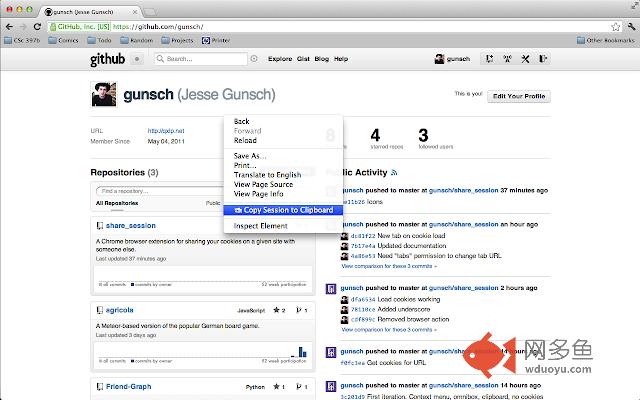
2. Right-click on any website you're logged in to and click "Copy Session to Clipboard".
3. Paste your clipboard contents to your friend, whether this is over chat, by email, or whatever method you prefer.
4. Your friend can copy that same text to their browser URL bar, then click "Load cookies and website" in the URL dropdown.
5. Success!
其他信息
官方唯一标识:dldfccnk****************mlbcgdao
官方最后更新日期:2012年8月8日
分类:辅助工具
大小:18.47KiB
版本:0.1.1
语言:English (United States)
提供方:none
星级:4.1
插件下载
| 下载链接一 下载链接二 |
| Chrome插件离线安装教程 |
温馨提示
本站中的部份内容来源网络和网友发布,纯属个人收集并供大家交流学习参考之用,版权归版权原作者所有。
如果您发现网站上有侵犯您的知识产权的作品,请与我们取得联系,我们会及时修改或删除。
如果您觉得网多鱼对您有帮助,欢迎收藏我们 Ctrl+D。