Send to Google Maps
插件截图
插件概述
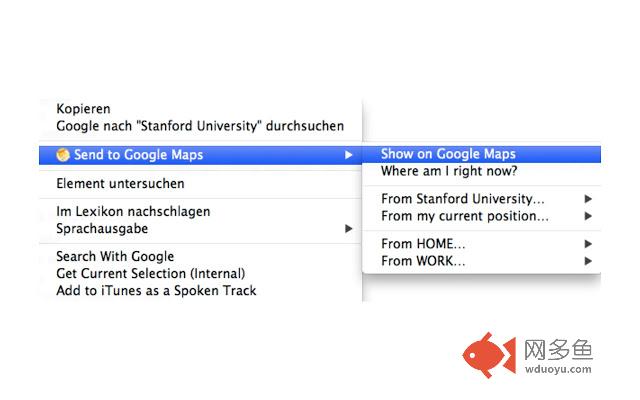
Sends the current text selection with 1-Click to Google Maps.插件详情
Send to Google Maps allows you to send a selected address or POI on any website directly to Google Maps. You no longer need to1.) copy the address or POI
2.) open a new tab
3.) enter http://maps.google.com
4.) paste the address
5.) press the search button
All these steps are done by "Send to Google Maps".
Therefore the extension adds an item to the Context Menu if text is selected. By right clicking on the selected text the context menu opens and you can click on "Send address to Google Maps".
A new tab will be opened and automatically search for the address on Google Maps.
And if you need directions:
Just go to the options page and enter up to five favorite addresses. They will be available in the context menu to easily get directions.
Also, you can select company names, names of sights and a lot more on any webpage to get directions to. Just try it out! It's not limited to addresses only...
Also, you can get directions from your current position. Just enable it in the options menu.
You need at least Chrome version 22 to install and use this extension.
Update 2.0:
======================================
- Get Directions:
You can now configure up to five addresses at the options page to easily get directions to and from a selected address on any website
- Browser language detection to localize your Google Maps Search
Update 2.1:
======================================
- Minor Bug Fixes
Update 2.3:
======================================
- Minor Bug Fixes
- Browser language detection to localize the options' page search results
Update 3.0:
======================================
- Major changes to meet Google Chrome's new extension policy
- Added "Where am I" and directions to user's current position to the context menu
- Added country selector to optimize search results within optins menu
- Context menu restructured
- Reworked the options page
Update 3.1:
======================================
- Fixed error to correctly show all menu entries after Chrome restart
Update 3.5:
======================================
- Added options for default transportation modes. You can now set the default travel mode to either driving, waking, bicycling or public transport.
- Added options for context menu customization. You can now remove all sub menus for faster access to "Show on Maps" or just add the sub menus you require. Unfortunately, Google Chrome Extensions don't allow to place multiple context menus entries on the top level of the context menu. Based on all your feedback I added this option to reduce the depth of the context menu.
- Fixed broken address auto completation on options page.
- Added internal usage statistics for further feature optimizations.
Update 3.7:
======================================
- Added shortcut support. Press Ctrl+1 (on Mac Cmd+1) to directly open Google Maps with the current text selection.
- If you have entered favorite addresses, you can use Ctrl+Shift+1 (on Mac Cmd+Shift+1) to open Google Maps with directions from selected Text to first address. Use Alt+Shift+1 to open Google Maps with directions from first address to selected text.
- This also works for the second address, but Google does not allow extensions to add more than 4 shortcuts. But you can add manually here: chrome://extensions/configureCommands
- Fixed typo in address spelling ;-)
其他信息
官方唯一标识:bhggankp****************dmiikolo
官方最后更新日期:2018年1月29日
分类:辅助工具
大小:336KiB
版本:3.7
语言:English
提供方:www.romanschlich.de
星级:4.5
插件下载
| 下载链接一 下载链接二 |
| Chrome插件离线安装教程 |
温馨提示
本站中的部份内容来源网络和网友发布,纯属个人收集并供大家交流学习参考之用,版权归版权原作者所有。
如果您发现网站上有侵犯您的知识产权的作品,请与我们取得联系,我们会及时修改或删除。
如果您觉得网多鱼对您有帮助,欢迎收藏我们 Ctrl+D。