Save to folder from context menu
插件截图
插件概述
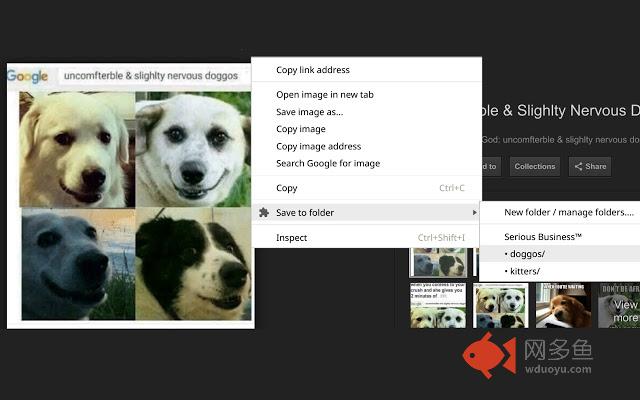
Quickly download stuff to your pre-chosen folders from the comfort of your context menu!插件详情
**NOTE**: For security reasons, Chrome doesn't allow extensions to do certain things, such as choosing arbitrary download locations or disabling the "save as" dialog. But you can do it! I believe in you! Just read on.How to use, step-by-step:
1. In the extension's settings page, set up a list of folders. These will appear on your context menu so you can download stuff directly to them.
2... Uhh, that's it.
** FAQ **
* How do I download to locations outside the default downloads folder?
You just need to set up symlinks (for more info, just head to the settings page after you install the extension).
* How do I get rid of the "save as" dialog?
Just head to your browser's preferences and disable this feature.
* I find this extension so outrageously stupid. What should I do?
Feel free to complain at:
https://github.com/edjroot/webext-save-to-folder/issues
其他信息
官方唯一标识:pdlkjdlb****************pdoncgdk
官方最后更新日期:2019年5月31日
分类:辅助工具
大小:98.97KiB
版本:0.0.5
语言:English
提供方:none
星级:3.3
插件下载
| 下载链接一 下载链接二 |
| Chrome插件离线安装教程 |
温馨提示
本站中的部份内容来源网络和网友发布,纯属个人收集并供大家交流学习参考之用,版权归版权原作者所有。
如果您发现网站上有侵犯您的知识产权的作品,请与我们取得联系,我们会及时修改或删除。
如果您觉得网多鱼对您有帮助,欢迎收藏我们 Ctrl+D。