Reluminate
插件截图
插件概述
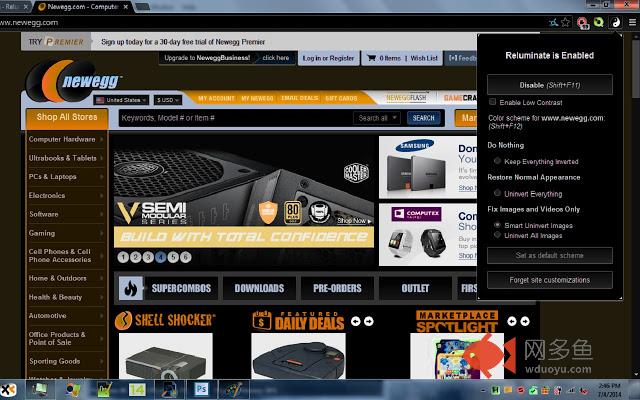
De-invert the luminance of entire pages or only images in Chrome for your already inverted screen.插件详情
This is a fork of Deluminate 0.3.2 with two changes.First of all this extension has been designed to be used with entire screen inversion software such as NegativeScreen. If you're like me, you want everything to be black with white text, not just websites in Chrome. When your entire screen is inverted, it comes in handy to have Chrome re-invert some of the images in special ways. Deluminate does an OK job with this, but some of the rules don't work properly with an inverted screen. My new altered version called Reluminate changes how some of these inversion schemes work in order to make it work better with an already inverted screen.
The second change is less obvious, but, in my opinion, equally as significant. The scheme setting rules have been improved to apply domain rules to all subdomains that do not have rules already. For example, the rule for imgur.com will also apply to any subdomains of imgur.com such as user.imgur.com. However, if a rule is made for user.imgur.com, the imgur.com rule will not apply to that subdomain. In Deluminate (including the current version), there is no way to apply domain rules to subdomains, so this is a feature improvement in most cases.
Future plans:
+ Improved interactive tabbed interface, possibly an additional options page.
+ Optional to go between reluminate/deluminate mode. This will be for people who just want something to work like Deluminate, but to have the improved scheme rule handling that I have introduced.
+ More features and options for rule handling so you can customize how you want it to work including features such as allowing specific pages within a domain to be handled differently.
其他信息
官方唯一标识:ejfgkpnd****************obdmcgji
官方最后更新日期:2014年7月4日
分类:辅助工具
大小:17.99KiB
版本:1.0
语言:English
提供方:none
星级:3.7
插件下载
| 下载链接一 下载链接二 |
| Chrome插件离线安装教程 |
温馨提示
本站中的部份内容来源网络和网友发布,纯属个人收集并供大家交流学习参考之用,版权归版权原作者所有。
如果您发现网站上有侵犯您的知识产权的作品,请与我们取得联系,我们会及时修改或删除。
如果您觉得网多鱼对您有帮助,欢迎收藏我们 Ctrl+D。