Read&Write for Google Chrome™
插件截图
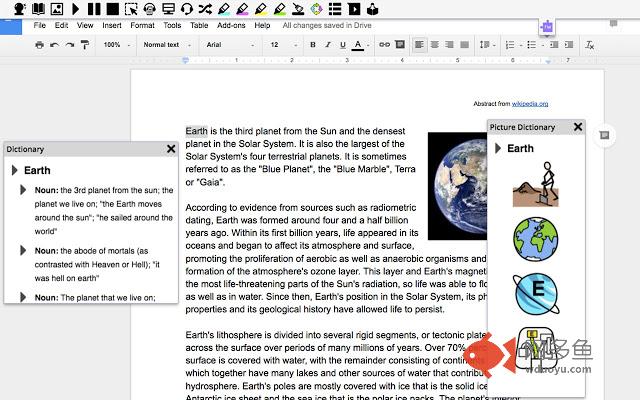
插件概述
Boost reading and writing confidence across all types of content and devices, in class, at work, and at home!插件详情
Wonderfully intuitive and easy-to-use, Read&Write for Google Chrome™ provides personalized support to make documents, web pages and common file types in Google Drive (including: Google Docs, PDF & ePub) more accessible. It’s designed to help everyone engage with digital content in a way that suits his/her abilities and learning styles.Read&Write offers a range of powerful support tools to help you gain confidence with reading, writing, studying and research, including:
• Text-to-speech to hear words, passages, or whole documents read aloud with easy-to-follow dual color highlighting
• Text and picture dictionaries to see the meaning of words explained
• With speech-to-text, dictate words to assist with writing, proofreading & studying
• Word prediction offers suggestions for the current or next word as you type
• Collect highlights from text in documents or the web for summarizing and research
• Create and listen to voice notes directly inside of Google Docs
• Simplify and summarize text on web pages to remove ads and other copy that can be distracting
Install Read&Write for Google Chrome to access ALL of these features FREE for 30 days!
Teachers can get a FREE premium subscription to Read&Write for Google Chrome. To register and activate your subscription, go to texthelp.com/en-gb/products/read-write/free-for-teachers/ after installing the Read&Write for Google Chrome trial.
Get more information on Read&Write for Google Chrome™ features, licensing, and pricing at
texthelp.com/en-gb/products/read-write/premium-features/
其他信息
官方唯一标识:inoeonmf****************ajkcphgd
官方最后更新日期:2019年6月3日
分类:辅助工具
大小:1.18MiB
版本:1.8.0.295
语言:支持9种语言
提供方:texthelp.com
星级:3.2
插件下载
| 下载链接一 下载链接二 |
| Chrome插件离线安装教程 |
温馨提示
本站中的部份内容来源网络和网友发布,纯属个人收集并供大家交流学习参考之用,版权归版权原作者所有。
如果您发现网站上有侵犯您的知识产权的作品,请与我们取得联系,我们会及时修改或删除。
如果您觉得网多鱼对您有帮助,欢迎收藏我们 Ctrl+D。