Quick Search TC/QM
插件截图
插件概述
Easily search in TC and QM插件详情
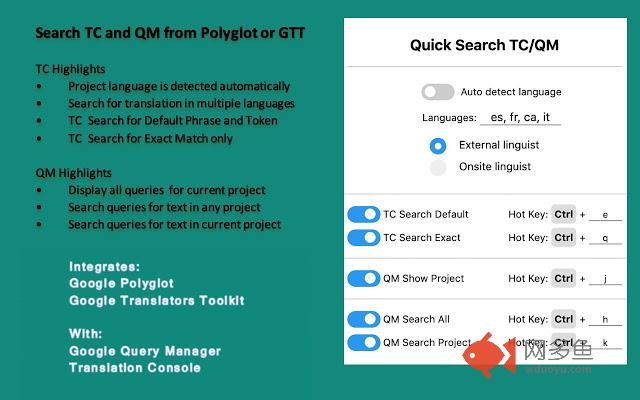
Update! Now features advanced searches in Query ManagerTo search TC or QM:
1. Highlight the text you want to search
2. Right-click to select the search option or use the keyboard shortcut
To display all queries for project in QM
1. Do NOT highlight any text
2. Right-click to select "QM Show Project" or use the keyboard shortcut
Highlights
- The three QM search options effectively allow you to search QM for "text only", "text and project" or "project only"
- The language is autodetected – no need to configure the tool
- You can manually add several languages for TC searches
- You can search for the exact UI string using the Message ID
- You can switch on/off the individual right-click search options
- The hotkey shortcuts are always active, even if you switch off the menu
- You can change the hotkey according to your preferences
- This version is made for Polyglot and GTT
______________
Version History:
v. 1.4.1 Replaced hotkey "j" with "a" due to a conflict with GTT
v. 1.4 Now supports autodetection of project language, searches in multiple languages, advanced options for searching query manager. This release is made for Polyglot in mind and also fixes various known bugs.
v. 1.3 Now supports both “exact” and “default phrase and token” searches.
v. 1.2 Now supports the use of a keyboard shortcut.
v. 1.1 Now supports access for onsite linguist.
v. 1.0 First basic release.
其他信息
官方唯一标识:lbdmjkfk****************bebjlbai
官方最后更新日期:2019年4月19日
分类:辅助工具
大小:10.42KiB
版本:1.4.1
语言:English (United States)
提供方:none
星级:4.5
插件下载
| 下载链接一 下载链接二 |
| Chrome插件离线安装教程 |
温馨提示
本站中的部份内容来源网络和网友发布,纯属个人收集并供大家交流学习参考之用,版权归版权原作者所有。
如果您发现网站上有侵犯您的知识产权的作品,请与我们取得联系,我们会及时修改或删除。
如果您觉得网多鱼对您有帮助,欢迎收藏我们 Ctrl+D。