Panel View for Google™ Translate
插件截图
插件概述
Access to a floating multilingual Google™ Translate panel on any webpage插件详情
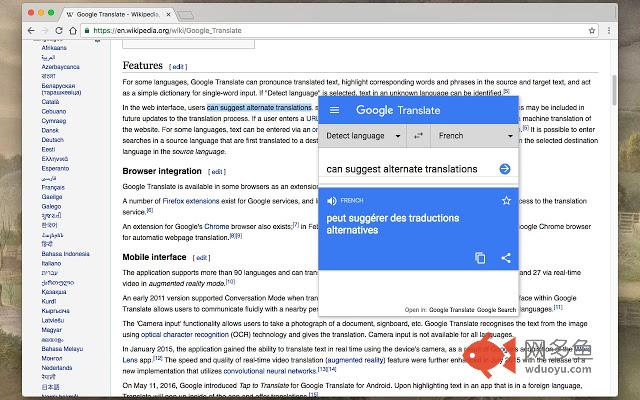
"Panel View for Google™ Translate" add-on let you have access to the beloved Google Translate on any websites. Upon selecting a word or sentence, a bubble appears on top of your selection area, allow you to load Google Translate inside the page instead of switching to a new tab and load it therePlease note that the sole purpose of this add-on is to provide an easier way to access the official Google Translate. There is NO intention on misleading users that this product is offered by Google. It is just a small tool to help you have access the beloved translator easier.
Features:
1. Panel view of Google Translate on any website
2. Right click context menu to open selection in Google Translate
3. Links on panel to open Google Define or Google Translate.
For bug reports please visit:
https://github.com/schomery/dictionary/
Change Logs:
0.3.5
1. There is a new option to use right-click instead of the bubble mode. Activating the right-click menu-item, disables the bubble selection mode.
2. It is now possible to translate the entire page using the toolbar button. If it is not needed, hide the button
3. It is now possible to remove the right-click context-menu items for page and links actions (Bing translation and Google translation)
其他信息
官方唯一标识:bcefgmhp****************ogjhaagl
官方最后更新日期:2019年5月22日
分类:辅助工具
大小:62.23KiB
版本:0.4.3
语言:English
提供方:none
星级:4.4
插件下载
| 下载链接一 下载链接二 |
| Chrome插件离线安装教程 |
温馨提示
本站中的部份内容来源网络和网友发布,纯属个人收集并供大家交流学习参考之用,版权归版权原作者所有。
如果您发现网站上有侵犯您的知识产权的作品,请与我们取得联系,我们会及时修改或删除。
如果您觉得网多鱼对您有帮助,欢迎收藏我们 Ctrl+D。