Online speech recognition
插件截图
插件概述
Speech to text on any web site and in Windows and Linux applications插件详情
See https://voicenotebook.com/blog/exthelp/ for helpThe main features:
Multi language support (click on the extension icon and select a language in the drop-down list)
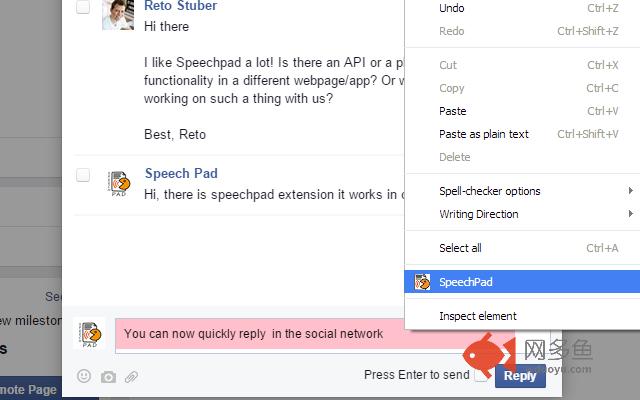
Speech input in any text field on the web (right click inside of the text entry field and select Speech pad in the Chrome shortcut menu)
Voice input to the clipboard - right click in the empty space on the page (not in the editable field), and select Speech pad in the Chrome shortcut menu. In this case, the Speechpad.pw site will be opened and voice recognition will be started. if the "Transfer to clipboard" checkbox is checked in the option page of the extension, then the voice typing processed directly to the system clipboard.
Dictation to any windows or Linux application (Word, Excel, Gedit etc.). For this option an additional module must be installed from the Speechpad.pw site.
Product doesn’t handle personal or sensitive user data.
其他信息
官方唯一标识:pehlbpmp****************acolpdcf
官方最后更新日期:2018年4月29日
分类:辅助工具
大小:39.18KiB
版本:9.9
语言:支持2种语言
提供方:https://speechpad.ru
星级:4.2
插件下载
| 下载链接一 下载链接二 |
| Chrome插件离线安装教程 |
温馨提示
本站中的部份内容来源网络和网友发布,纯属个人收集并供大家交流学习参考之用,版权归版权原作者所有。
如果您发现网站上有侵犯您的知识产权的作品,请与我们取得联系,我们会及时修改或删除。
如果您觉得网多鱼对您有帮助,欢迎收藏我们 Ctrl+D。