One-Handed Image Downloader
插件截图
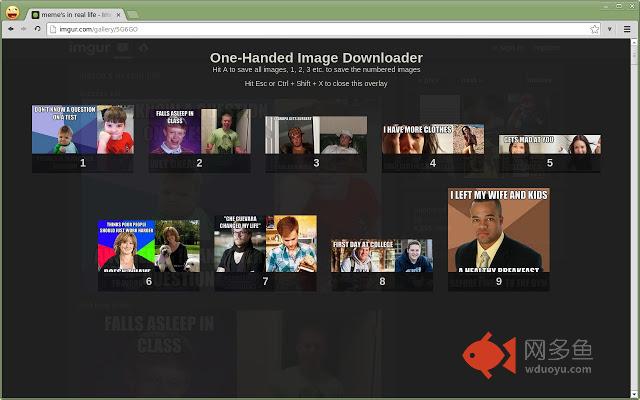
插件概述
A mouseless, fast & easy way to save pictures from any website插件详情
// UpdateKeyboard shurtcut has changed to [Ctrl] + [K]. If you don't like it you can change in Chrome -> Tools -> Extension, scroll to the bottom and click "Keyboard shortcuts".
Maybe you know this: Your browsing images, e.g. like on imgur, and suddenly you want to save an image. But your right hand is busy stirring your coffee, petting your cat or whatever.
Maybe you're just some kind of homerow junkie that is repulsed by the thought of having to use the mouse.
Don't worry, I'm not here to judge but to help. This is for you.
The goal of this extension is to allow for one-handed, mouseless image saving operations on any website.
If you active the extension via it's shortcut [Ctrl] + [K], one of two things happen:
- if there is only one relevant image on the page, the download dialogue is opened
if there are many relevant images on the page, you will be presented an overlay with the images. Each images is labeled with a number from 1 to 9 and you can download the image by hitting the number on your keyboard.
Close the overlay with [Esc] or [Ctrl] + [Shift] + [K]
Relevant pictures are either higher or wider than 350 px or a GIF.
I will try to keep the gifs from polluting your results, if you notice any wrong GIFs being included, you're very welcome to open an issue or send a pull request.
其他信息
官方唯一标识:keomfdkn****************gahgdgid
官方最后更新日期:2014年2月19日
分类:辅助工具
大小:656KiB
版本:1.0.1
语言:English (United States)
提供方:none
星级:2.7
插件下载
| 下载链接一 下载链接二 |
| Chrome插件离线安装教程 |
温馨提示
本站中的部份内容来源网络和网友发布,纯属个人收集并供大家交流学习参考之用,版权归版权原作者所有。
如果您发现网站上有侵犯您的知识产权的作品,请与我们取得联系,我们会及时修改或删除。
如果您觉得网多鱼对您有帮助,欢迎收藏我们 Ctrl+D。