Marking Menu for Google Chrome™
插件截图
插件概述
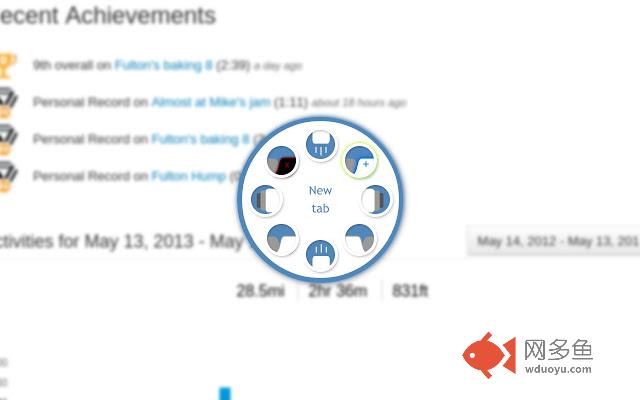
Allows you to navigate with pen flicks/mouse gestures. To use, hold the middle-mouse button, select an action, and release.插件详情
Marking Menu empowers you to surf the web with pen flicks or mouse gestures. It's a must-have extension if you have a Wacom tablet, but works great with a mouse or trackpad too!Out-of-the-box, you can:
- create and destroy tabs,
- travel forward and backward through your history,
- move between tabs, and
- fling the page up or down.
You can also extend Marking Menu to support other actions!
Bring up the menu by holding the right mouse button. Then, move towards the appropriate icon, and release. If you are hovering over a link, the menu won't appear right away (in case you are trying to click a link), but will react appropriately if you flick.
If you'd prefer to use the middle mouse button instead, just make that change in the preferences. Simply browse to chrome:extensions and click the Options button next to Marking Menu for Google Chrome.
Change history:
- 0.6:
- Retina-quality images for the Chromebook Pixel.
- Updated to Chrome Manifest v2.
- Menu now defaults to right-mouse button.
- 0.5:
- Ability to change which actions appear in the menu.
- Support for third-party actions - if you specify an action that hasn't been handled by Marking Menu, it will dispatch an event from window for another extension to handle.
- Added support for Safari.
- 0.2.2:
- Finally fixed scrolling and back/forward compatibility in newer versions of Chrome.
- 0.2.1:
- Context menu enabled when you right-click a link.
- 0.2:
- Ability to select which button triggers the menu.
Notes:
- A marking menu can sometimes be called radial menu or pie menu. No matter what you call it, Chrome Marking Menu is what you're looking for.
- I've finally released the source code. It's no more ready for this now than it was when I started in 2009, but since I don't commit new changes very frequently anymore, I figured there's no sense it putting it off any longer:
https://code.google.com/p/marking-menu-js/
其他信息
官方唯一标识:dhbobbhc****************pfbmebgc
官方最后更新日期:2013年5月18日
分类:辅助工具
大小:200KiB
版本:0.6
语言:English
提供方:none
星级:4
插件下载
| 下载链接一 下载链接二 |
| Chrome插件离线安装教程 |
温馨提示
本站中的部份内容来源网络和网友发布,纯属个人收集并供大家交流学习参考之用,版权归版权原作者所有。
如果您发现网站上有侵犯您的知识产权的作品,请与我们取得联系,我们会及时修改或删除。
如果您觉得网多鱼对您有帮助,欢迎收藏我们 Ctrl+D。