Lazy Eye Reader
插件截图
插件概述
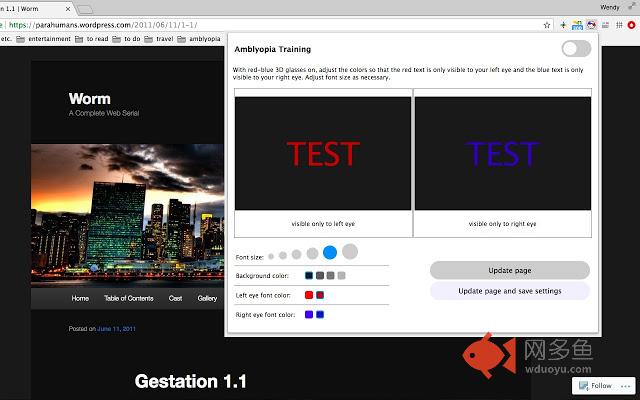
Web reader for treating ambloypia. Increases font size and recolors individual words to red or blue. Requires 3D red-blue glasses.插件详情
In the past, children would wear an eye patch over their dominant eye to treat lazy eye (amblyopia). The treatment wasn't effective for adults. Today, people of all ages with amblyopia can improve the condition through antisupression therapy.This Chrome extension enables a form of antisupression therapy. It randomly recolors individual words on a webpage to red or blue. When wearing 3D red-blue glasses, a person's left eye can only see red text while a person's right eye can only see blue text. This forces eyes to work together to make sense of a block of text.
Train your eyes while reading the daily news or your favorite blog post : )
Detailed Instructions:
• Click the extension icon to open the settings window.
• Select from the font size and font color options.
• Recolor the webpage by clicking "Update page" or "Update page and save settings".
• If settings are saved, turn on the toggle at the top right-hand corner to recolor a page whenever the extension's opened.
Disclaimer: I have had amblyopia since childhood; however, I'm not an optometrist! Consult your optometrist for more personalized advice.
其他信息
官方唯一标识:modeppgk****************eilomocj
官方最后更新日期:2018年9月9日
分类:辅助工具
大小:28.39KiB
版本:0.0.2
语言:English
提供方:none
星级:5
插件下载
| 下载链接一 下载链接二 |
| Chrome插件离线安装教程 |
温馨提示
本站中的部份内容来源网络和网友发布,纯属个人收集并供大家交流学习参考之用,版权归版权原作者所有。
如果您发现网站上有侵犯您的知识产权的作品,请与我们取得联系,我们会及时修改或删除。
如果您觉得网多鱼对您有帮助,欢迎收藏我们 Ctrl+D。