Jirozaur
插件截图
插件概述
Helps save and paste text into web page text fields with proper id.插件详情
What Jirozaur does?Jirozaur helps you paste saved text into web page text fields.
Enter text and ID of the text field you wanna insert text into and click 'PasteIt' to paste it. Click 'SaveIt' to save text and IDs for later. Buttons 'SaveItAll' and 'PasteItAll' helps you do four actions at once :)
How to get text field ID? What is it?
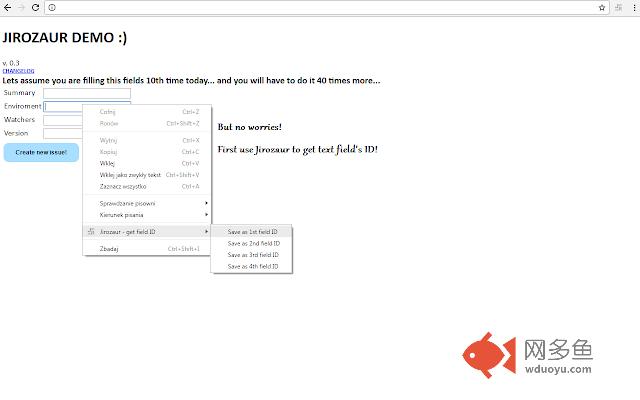
The id attribute specifies a unique id for an HTML element (the value must be unique within the HTML document). According to W3Schools. Too much blahblahblah? Just right click on the text field which you are interested in and and use Jirozaur context action to get and save its text field's ID (feature available in versions 0.3+). Easy, isn't it?
Add-on inspiration notes
Add-on is inspired by Selenium and Jira. Uses Selenium-like feature to paste text into text field with specific ID and solves Jira problem where to store that all data that you have to paste into text fields each time when you are create new issue on Jira.
For example: 10 people asked you to paste them into watchers when you create new issue. Here what you do: paste once all 10 watchers into Jirozaur, type there watchers text field ID, click 'SaveIt' et voila! Each time you create new issue, just click Jirozaur button, click 'PasteIt' and make your life easier! Maybe you will find better, other uses for this add-on ;)
Where does Jirozaur store data?
Add-on uses chrome.storage.local to store data and according to documentation: "Items in the local storage area are local to each machine."
其他信息
官方唯一标识:elfpoaec****************fcmddpmi
官方最后更新日期:2016年10月16日
分类:辅助工具
大小:37.65KiB
版本:0.3
语言:English
提供方:none
星级:none
插件下载
| 下载链接一 下载链接二 |
| Chrome插件离线安装教程 |
温馨提示
本站中的部份内容来源网络和网友发布,纯属个人收集并供大家交流学习参考之用,版权归版权原作者所有。
如果您发现网站上有侵犯您的知识产权的作品,请与我们取得联系,我们会及时修改或删除。
如果您觉得网多鱼对您有帮助,欢迎收藏我们 Ctrl+D。