GoCard extension for Bank Discount
插件截图
插件概述
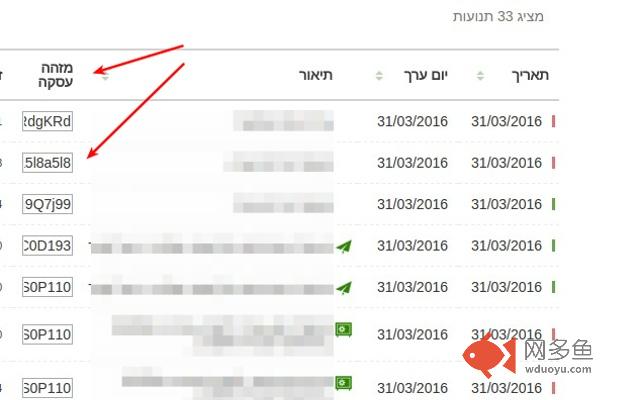
Shows "Transaction ID" column on the transaction list in Bank Discount's online system. Works only on "Recent transactions" page插件详情
Thanks to this extension, when you log into your online account at Bank Discount and navigate to "Recent Transactions" page, you will see an additional column, called "Transaction ID". It will contain fields with Transaction IDs for particular transactions.ATTENTION: The IDs will not be visible on the homepage of your Discount account - i.e. the page that you see just after logging in. You have to navigate to "Recent transactions" page.
You should find the transaction which corresponds to the wire transfer you made for your GoCard deposit and click the field containing the Transaction ID for that transaction. All the contents of the ID will be selected and you will only need to press CTRL+C on your keyboard in order to copy it to clipboard.
After you copy the Transaction ID, go to your GoCard account, navigate to "My Deposits" page, find your deposit that you want to confirm on the list, and click "Mark as paid" or "Correct payment data". When you are on "Confirm Deposit" page, you can paste the Transaction ID and click "Confirm deposit" and if everything goes right, you will confirm your deposit immediately and consequently your card will be issued or loaded with additional money.
其他信息
官方唯一标识:fpldefim****************jghnebmb
官方最后更新日期:2016年4月14日
分类:辅助工具
大小:6.11KiB
版本:0.0.4
语言:English
提供方:none
星级:5
插件下载
| 下载链接一 下载链接二 |
| Chrome插件离线安装教程 |
温馨提示
本站中的部份内容来源网络和网友发布,纯属个人收集并供大家交流学习参考之用,版权归版权原作者所有。
如果您发现网站上有侵犯您的知识产权的作品,请与我们取得联系,我们会及时修改或删除。
如果您觉得网多鱼对您有帮助,欢迎收藏我们 Ctrl+D。