EasyReader
插件截图
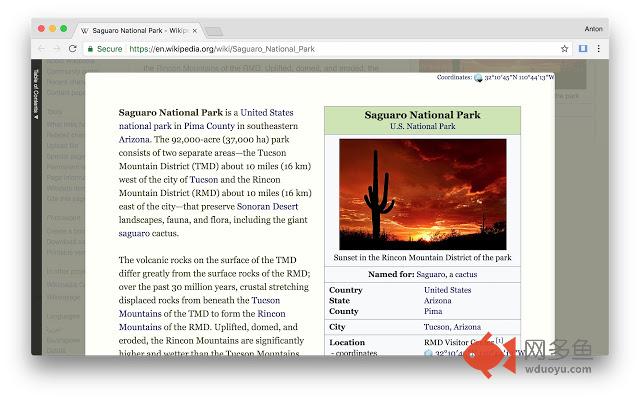
插件概述
EasyReader can customize and improve the readability of long web articles插件详情
Make any article or part of a website more readable!Usage:
1. Click extension button.
2. Select content on the page to read.
3. Enjoy.
Features:
★ Table of contents for headings are provided to the left.
★ Color, size, fonts and more are fully customizable.
★ Print, will print selected content only.
★ Code highlighting for code segments without other style.
Tips:
☞ Drag right edge of content to change width.
☞ Background can be customized using images, not only colors. Example for background color use: url("http://antonj.se/resources/css/images/paper-texture-warm.gif")
☞ Hovering lables in option page will give you the actual CSS property that is used.
Updates:
1.61 - Minor bug fixes (no scrolling in original page)
1.60 - Minor bug fixes
1.50 – Keyboard shortcut to activate/deactivate EasyReader (set in extension options)
1.46-7 – Bugfix: Print width always 100 %
1.45 – Printing with EasyReader activated will only print selected content.
1.44 – Bugfix: Flash content temporary hidden, when ER is activated. Since Chrome7 Flash would otherwise always be above ER content.
1.43 – Bugfix: Google Dictionary (by Google) extension popup will be on top of EasyReader content.
1.40 – Syntax highlight for code segments of articles, using http://code.google.com/p/google-code-prettify/
其他信息
官方唯一标识:boamfhee****************klbhadhc
官方最后更新日期:2018年1月7日
分类:辅助工具
大小:62.47KiB
版本:0.161
语言:English
提供方:antonj.se
星级:4.6
插件下载
| 下载链接一 下载链接二 |
| Chrome插件离线安装教程 |
温馨提示
本站中的部份内容来源网络和网友发布,纯属个人收集并供大家交流学习参考之用,版权归版权原作者所有。
如果您发现网站上有侵犯您的知识产权的作品,请与我们取得联系,我们会及时修改或删除。
如果您觉得网多鱼对您有帮助,欢迎收藏我们 Ctrl+D。