Easy Password Handling
插件截图
插件概述
Generates safe and service specific passwords for web services on the fly.插件详情
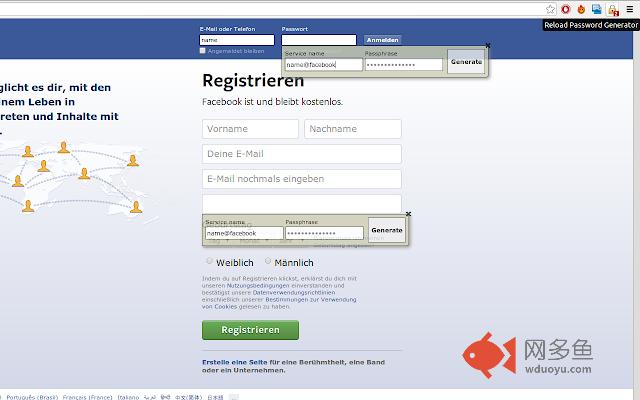
If you want different and more secure passwords for each service you are using but do not want to remember them, try this extension!Once installed it creates an overlay for every password field on the page you are visiting. As soon as you activate the password field the overlay activates and asks you to enter your servicename and password. The servicename can be generated by the domain name and a prefix/suffix you defined or your login name. As long as the servicename differs you can use the same password for every service you are using, creating different results as your final and service specific password. The password generated will be inserted into the password field and can be sent automatically.
Usage
1. Use the extension options to configure allowed or required characters, the servicename generation with prefix/suffix or login name and so on. To make sure most services accept your password you should select the forbidden option for characters '!@#$%' and 'SPACE' which is the default setting by version 1.0.0.
2. Login to your account and change the password or create a new account. As soon as you hit the password field an overlay should open with a preset servicename and another password field. Choose your servicename and password and hit the Generate Button. Save the changes and logout.
3. Now you should be able to login with the overlay opening as soon as you hit a password field. Make sure you use the same servicename and password as set before. The number of password fields found should be shown in front of the extension icon. If there was a password field on the page but no overlay opened, please click on the extension icon to rerun the password field recognition. If that didn't help, you might have found a bug...
To retrieve the generated password you can use https://getvau.lt/. Enter the servicename and passphrase and you get your password right away. Both services do not send any server requests. The extension's source code is available at github, too: https://github.com/bgrande/pwgenerator-extension.
If you found an error or have any suggestions feel free to create an issue at https://github.com/bgrande/pwgenerator-extension/issues.
其他信息
官方唯一标识:fobokeoc****************najichnj
官方最后更新日期:2018年12月13日
分类:辅助工具
大小:59.36KiB
版本:1.9.8
语言:支持2种语言
提供方:none
星级:5
插件下载
| 下载链接一 下载链接二 |
| Chrome插件离线安装教程 |
温馨提示
本站中的部份内容来源网络和网友发布,纯属个人收集并供大家交流学习参考之用,版权归版权原作者所有。
如果您发现网站上有侵犯您的知识产权的作品,请与我们取得联系,我们会及时修改或删除。
如果您觉得网多鱼对您有帮助,欢迎收藏我们 Ctrl+D。