Dyslexia Formatter
插件截图
插件概述
WIP Extension that will make browsing the internet easier for dyslexic people.插件详情
Dyslexia Formatter is a Chrome Extension meant to stylize websites in a way that will make it easier to read for people affected by dyslexia. Due to the majority of websites’ usage of serif fonts, it is harder for dyslexic people to read these sites. This small extension hopes to style the text and background color, using sans-serif fonts to replace the standard fonts websites use in order to increase accessibility for these users, to their preference.With the press of the tilde (~) key you will have the ability to select portions of the website that you wish to format.
Change the stylings that you wish to use, in the forms of text, background color, overlay, and paragraph spacing.
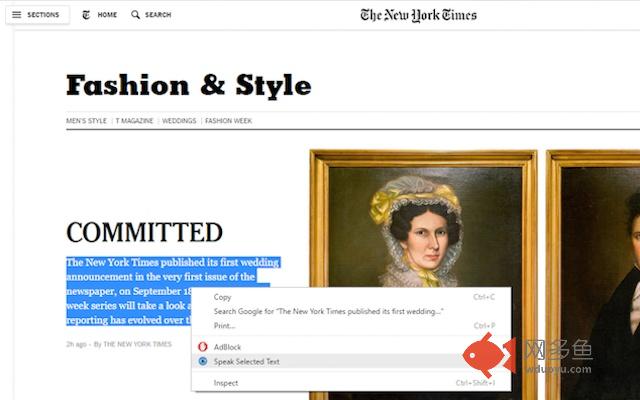
Any text that is still hard to read can be read using the speech synthesizer included.
Usage-
Upon installation:
* Go to any website and press the tilde (~) key.
* Press the backslash (\) key to enable and disable the overlay
* Hover your mouse over any section you wish to change (it will be highlighted), and upon clicking said section, the selected stylistic changes will be applied.
* Click on the same section again in order to revert the changes.
Enabling the text-to-speech feature:
* Text-to-speech while changing other user options requires you to open the popup set on your extension bar.
* Once any of these settings are changed you must save them and refresh your web page in order for them to take effect.
* Simply highlight any text that you wish to be spoken and press the forward slash (/) key to enable or disable
* The highlighted text will then be spoken with the user's desired settings.
其他信息
官方唯一标识:kggkghfh****************aipgogoc
官方最后更新日期:2017年4月6日
分类:辅助工具
大小:2.58MiB
版本:0.0.0.6
语言:English
提供方:none
星级:4.3
插件下载
| 下载链接一 下载链接二 |
| Chrome插件离线安装教程 |
温馨提示
本站中的部份内容来源网络和网友发布,纯属个人收集并供大家交流学习参考之用,版权归版权原作者所有。
如果您发现网站上有侵犯您的知识产权的作品,请与我们取得联系,我们会及时修改或删除。
如果您觉得网多鱼对您有帮助,欢迎收藏我们 Ctrl+D。