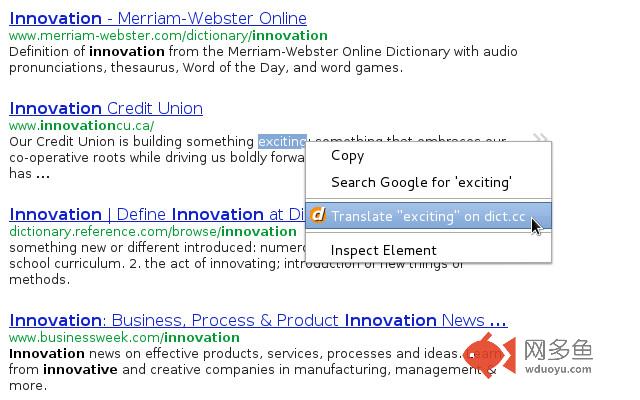
dict.cc context menu
插件截图
插件概述
add a context-menu for dict.cc插件详情
This extension adds a new line to your context menu, where you can easily translate the selected word on dict.ccCool! But there is an extension. Why do you created the same again?
You may have noticed that there already is an extension which integrates dict.cc in your browsers context menu.
But in my opinion it was doing too much. The context menu really annoyed me.
My workflow when i wish to translate something is actually the following:
1. i open a new tab (ctrl+t)
2. type dic
3. paste the word/phrase i want to get translated
4. close the tab
But when iam reading long texts, i would prefere a mouse-only solution.
Why should i use it?
1) It's easy to use
2) It's unobtrusive
3) It works well
4) It does not use any system resources until you open your context menu
5) It's open source! (Source: https://github.com/BreiteSeite/chrome-extension-dict-cc)
其他信息
官方唯一标识:ijmkoefd****************gkgbkfna
官方最后更新日期:2012年10月21日
分类:辅助工具
大小:3.53KiB
版本:1.0.2
语言:支持2种语言
提供方:none
星级:4.8
插件下载
| 下载链接一 下载链接二 |
| Chrome插件离线安装教程 |
温馨提示
本站中的部份内容来源网络和网友发布,纯属个人收集并供大家交流学习参考之用,版权归版权原作者所有。
如果您发现网站上有侵犯您的知识产权的作品,请与我们取得联系,我们会及时修改或删除。
如果您觉得网多鱼对您有帮助,欢迎收藏我们 Ctrl+D。