下载管理器
插件截图
插件概述
管理和使用您的快速轻松地下载互动插件详情
Rate and share !This is an open source Extension originally extended from chrome downloads API sample. You can find it on github at https://github.com/prabhat90/DownloadManager
Features:
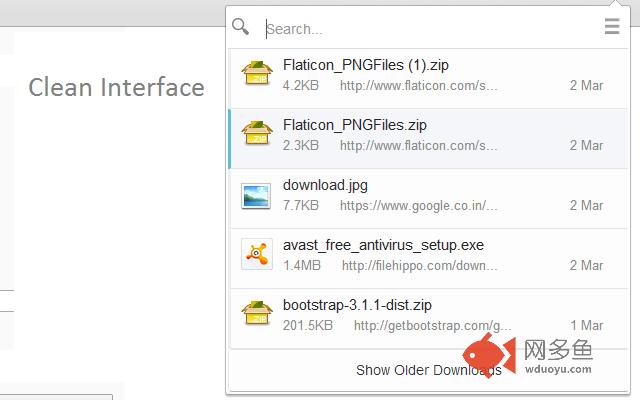
1. nice, clean interface to easily access and view info of your downloads in a popup.
2. right click menu for every action on download item(see screenshot).
3. Search your downloads as soon as you start typing.
4. Shows download progress with pause, resume and cancel options.
5. drag and drop the items onto applications.
6. Desktop Notifications on download complete.
7. visual notification when download starts.
8. shows remaining time of download completion and its progress in icon itself.
9. disables download shelf at the bottom.
10. keyboard shortcuts for every option.
Permissions:
downloads => to access download list
downloads.open => to open downloads
downloads.shelf => to disable default chrome download bar
clipboard => to copy download link onto clipboard
notifications => to create desktop notifications when download completes
activeTab=> to show download start notification in active tab
Update 3.0.0
==>nice new UI
==>delete from disk option
==>visual notification of download start
Update 2.8:
Settings page
Keyword shortcuts (know more on help page of extension)
Update 2.6:
Features: (1) Items are now dragable. You drag and drop the item to apropriate Application to open it.
(2) New scrollbars
(3) Destop Notification when Download completes (only when this popup is not open).
Update 2.5:
Feature: added right click menu for download options, added option to copy download link
其他信息
官方唯一标识:daoidaoe****************inkofmfe
官方最后更新日期:2016年3月19日
分类:辅助工具
大小:268KiB
版本:6.7.2
语言:支持14种语言
提供方:none
星级:4.2
插件下载
| 下载链接一 下载链接二 |
| Chrome插件离线安装教程 |
温馨提示
本站中的部份内容来源网络和网友发布,纯属个人收集并供大家交流学习参考之用,版权归版权原作者所有。
如果您发现网站上有侵犯您的知识产权的作品,请与我们取得联系,我们会及时修改或删除。
如果您觉得网多鱼对您有帮助,欢迎收藏我们 Ctrl+D。