copy 2 clipboard with ease
插件截图
插件概述
a simple way to copy tab title and url with ease插件详情
FeaturesA simple and quick way to copy title and url with ease in chrome browser.
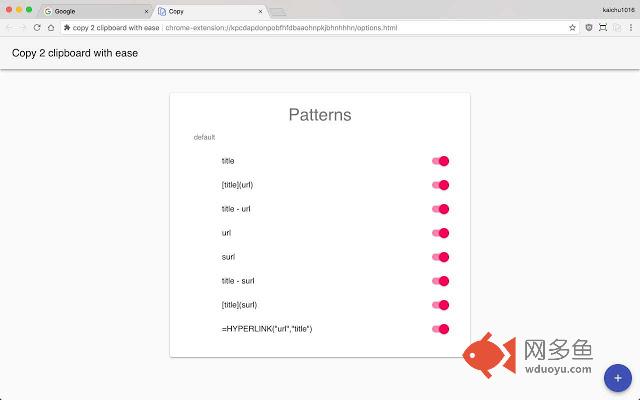
* default has 8 copy pattern
* `title`
* `[title](url)`
* `title - url`
* `url`
* `surl`
* `title - surl`
* `[title](surl)`
* `=HYPERLINK("url","title")`
* create custom pattern with `url`, `surl` & `title` (multiple) keyword to create arbitrarily pattern
* enable/disable copy pattern you want
* contextMenu support
Change log
2.0.0 / 2018-08-29
==================
* totally rewrite with react, redux & material UI
* 8 default copy pattern
* enable/disable copy pattern
* create custom copy pattern you want
* contextMenu support page/link source
1.0.3 / 2016-11-06
==================
* modify permissions
1.0.2 / 2015-11-23
==================
* fix shorten API error.
1.0.1 / 2015-04-05
==================
* pattern input problem and other bug fixed.
1.0.0 / 2015-04-03
==================
* add options settings sync via Google account between different chrome browser. Change UI themes from Bootstrap to semantic-ui. minors bug fixed.
0.0.110
==================
* add copy link with name feature.
0.0.109
==================
* chrome shortcut support. Default extension is "Shift+Alt+C". You can setup shortcut you want to enable fast copy one option of 5.
0.0.104
==================
其他信息
官方唯一标识:hiiobhaa****************lemmcoah
官方最后更新日期:2018年8月29日
分类:辅助工具
大小:352KiB
版本:2.0.0
语言:English
提供方:none
星级:4.3
插件下载
| 下载链接一 下载链接二 |
| Chrome插件离线安装教程 |
温馨提示
本站中的部份内容来源网络和网友发布,纯属个人收集并供大家交流学习参考之用,版权归版权原作者所有。
如果您发现网站上有侵犯您的知识产权的作品,请与我们取得联系,我们会及时修改或删除。
如果您觉得网多鱼对您有帮助,欢迎收藏我们 Ctrl+D。