Comic Text
插件截图
插件概述
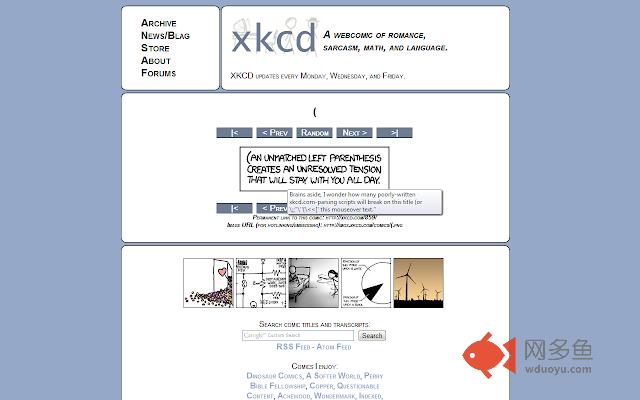
Replaces the built-in Chrome tooltip to enable easier reading of the mouseover title-text for popular webcomics, such as xkcd.插件详情
The source code for this extension is available on Github.https://github.com/dmillz/Comic-Text
NOTE: There is no way for me to respond to questions posted in the comments here in the Chrome Web Store. If you have a question, please contact me on Github instead:
https://github.com/dmillz/Comic-Text/issues
What is Comic Text?
------------------------------
Comic Text is a Chrome extension that seamlessly replaces the built-in Chrome tooltip to enable easier reading of the mouseover title-text for popular web comics, such as xkcd.
New! Comic Text is now capable of scanning the entire page and replacing tooltips for *any* page element, not just images. Turn on the option by accessing the Comic Text extension options ([Wrench Icon] > Tools > Extensions, and then find the "Options" link under the Comic Text extension.)
What's wrong with Chrome's mouseover text tooltips?
-----------------------------------------------------------------------------
They don't last long enough to read the entirety of the mouseover title text. By default, Chrome's tooltips disappear after about 5 seconds; but with Comic Text installed, they will last as long as your mouse remains over the image. Other people have also been annoyed by this behavior:
http://www.google.com/support/forum/p/Chrome/thread?tid=4f641efdaeb3c585
http://code.google.com/p/chromium/issues/detail?id=1441
Does this extension work on websites other than xckd.com?
---------------------------------------------------------------------------------------
Yes! By default, the Comic Text will "just work" when browsing xkcd.com, and you may use the extension options to customize the styling of the popup, or to enable Comic Text on your other favorite sites. (Access the extension options by clicking [Wrench Icon] > Tools > Extensions, and then find the "Options" link under the Comic Text extension.)
Why does the extension require permission to access "Your data on all websites"?
------------------------------------------------------------------------------------------------------------------------
The extension works by modifying the HTML/CSS of any pages that are on the whitelist. On image mouseover, the script removes any existing title text of the image in order to suppress the built-in tooltips, and then pops-up a new DOM element, cleverly styled to mimic the default Chrome tooltip.
The extension requires the "Your data on all websites" persmission so that it can modify the page you're browsing in this manner, but that's the only thing it does. It does not save any information (besides it's own options), nor does it communicate with the outside world. Everyone is welcome to examine (and reuse, remix, & share) the source code:
https://github.com/dmillz/Comic-Text
Comic Text doesn't seem to work on
--------------------------------------------------------------------------------
If you find a bug, or just have any other question, please submit it as an issue on Github:
https://github.com/dmillz/Comic-Text/issues
Thanks!
The Comic Text popup sometimes gets in my way.
-------------------------------------------------------------------------
You may dismiss the Comic Text tooltip by right-clicking on it.
# Thank you, Randall Munroe
Thank you, Randall Munroe, for the hilarious web comic, and also for releasing your work under the Creative Commons Attribution-NonCommercial 2.5 License (http://creativecommons.org/licenses/by-nc/2.5/). All of Comic Text's icons, images, screenshots, and inspiration have been derived from xkcd (http://xkcd.com).
Changelog
----------------
January 27, 2011
Version 1.0
- Initial Release
January 27, 2011
Version 1.0.1
- Fix to support Google Reader
January 29, 2011
Version 1.0.2
- More robust CSS (If you customized your CSS, it will not be overwritten. You'll have to "reset" it to get the update)
- Various tweaks and minor improvements
January 30, 2011
Version 1.0.3/1.0.4
- CSS updated to more closely mimic Chrome.
January 31, 2011
Version 1.0.5
- Fix for issue where popups would get "stuck" when quickly mousing between multiple titled images.
- Popup is now positioned offset below the mouse cursor.
- Another minor CSS tweak.
February 12, 2011
Version 1.1.0
- Some "under the hood" changes.
February 18, 2011
Version 1.1.1
- Fixed loading of default whitelist.
February 24, 2011
Version 1.1.2
- Fixed bug in the way the popup was being positioned
- Extension should now load slightly faster
August 7, 2011
Version 1.2.0/1.2.1
- New! Optionally replace tooltips for *ALL* HTML elements, not just images.
- Rewritten tooltip engine for superior performance.
- Shiny new options page.
September 2, 2011
Version 1.2.2/1.2.3/1.2.4
- The Comic Text tooltip may now be dimissed by right clicking on it.
- When using Comic Text to replace all HTML elements