Color Changer
插件截图
插件概述
Change website colors to your liking.插件详情
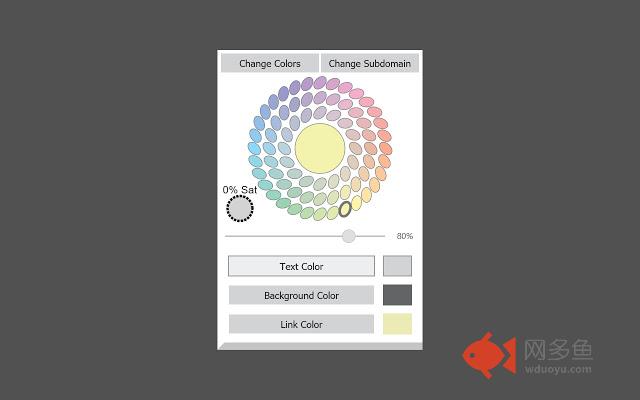
How to use:1. Click the Text Color, Background Color, or Link Color button. A border will appear around the button letting you know it's active.
2. Choose a color on the color wheel to change the color. You can see your changes dynamically.
3. Now, whenever you want to change the colors of a site, just hit the Change Colors button. You can also change colors via a right-click context menu.
You can also enable or disable Color Changer for specific subdomains with the Always or Never button.
What is a subdomain? For example, the subdomain in developer.mozilla.org is "developer". Most of the time, the subdomain will be "www".
Mousing over the gray bar at the bottom will open a flyout menu. To clear all saved colors and subdomains, click Clear Data. There also happens to be a donate button down there. :)
About the color wheel:
Colors are less saturated (more gray) near the center and 100% saturated (no gray) on the edge. There is a separate swatch to the side that says "0% Sat", meaning 0% saturation or 100% gray.
There is also a lightness slider below the color wheel. Lower tends to black, and higher tends to white.
Please report any bugs or problems with specific sites to: webextdev@gmail.com.
其他信息
官方唯一标识:nmdgidof****************ckpioifp
官方最后更新日期:2019年1月4日
分类:辅助工具
大小:115KiB
版本:2.0.0
语言:English (United States)
提供方:none
星级:3
插件下载
| 下载链接一 下载链接二 |
| Chrome插件离线安装教程 |
温馨提示
本站中的部份内容来源网络和网友发布,纯属个人收集并供大家交流学习参考之用,版权归版权原作者所有。
如果您发现网站上有侵犯您的知识产权的作品,请与我们取得联系,我们会及时修改或删除。
如果您觉得网多鱼对您有帮助,欢迎收藏我们 Ctrl+D。