Categorizer
插件截图
插件概述
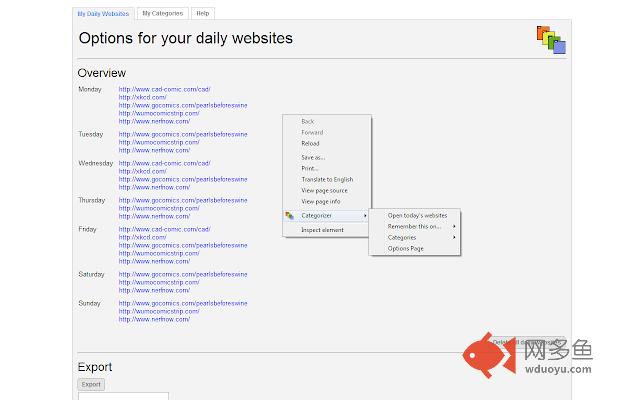
Categorizer lets you manage and categorize the websites you visit regularly and the ones you only visit on certain days of the week!插件详情
Categorizer is here to help you with never falling behind by forgetting to visit certain websites in general and on certain days of the week.For a short guide of how to access the options page, scroll down to the bottom of this page.
The features of Categorizer are as follows:
✔ You can save websites to certain days of the week and with a click on the mouse open the websites associated with the current day (in their own tabs). This is useful for websites with specific update schedules, like: online comics, movie sites and other areas as well.
✔ Create and manage self-made categories. With this you can create categories and add websites to them. These can be opened in just a click as well.
✔ Most of the functionality is available to you just by right-clicking the mouse and choosing the extension's menu-item "Categorizer".
✔ Easy import and export features for syncing with your other computers - or share your categories or your daily website schedule with your friends and family.
✔ [your idea!] If you got an idea for changes or extra functionality - please let me know!
##############################################################
How do I use this?
- Right click the mouse on something that's not an image, canvas or the like. Then choose the "Categorizer" menu and the options are right there.
Another option is to go to your extension managing page, then find the Categorizer extension and click on the "Options" link.
其他信息
官方唯一标识:jmgbopnl****************admjeeid
官方最后更新日期:2017年6月13日
分类:辅助工具
大小:55.29KiB
版本:1.1.8
语言:English
提供方:none
星级:4.3
插件下载
| 下载链接一 下载链接二 |
| Chrome插件离线安装教程 |
温馨提示
本站中的部份内容来源网络和网友发布,纯属个人收集并供大家交流学习参考之用,版权归版权原作者所有。
如果您发现网站上有侵犯您的知识产权的作品,请与我们取得联系,我们会及时修改或删除。
如果您觉得网多鱼对您有帮助,欢迎收藏我们 Ctrl+D。