Bookmark Changer
插件截图
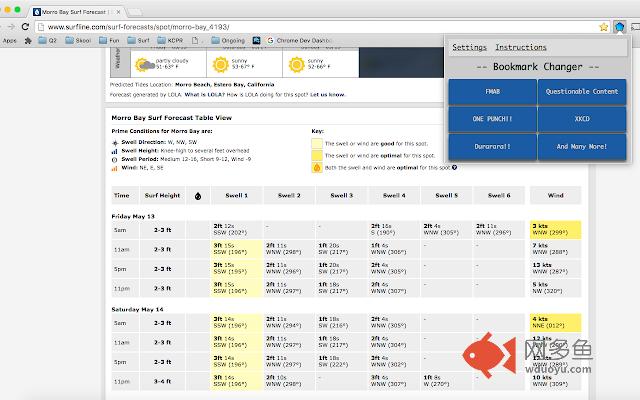
插件概述
Lets the user select a bookmark that is constantly changing and switch it to the url of the current tab quickly and conveniently插件详情
Do you have several bookmarks that you find are constantly occupying open tabs? Do you wish you could save your progress on a webcomic or a or TV show without going through the long and arduous process of deleting the previous bookmark, creating a new one, and placing it in the appropriate folder? Look no further than Bookmark Changer (name subject to change)!With bookmark changer, the user can select a bookmark, or even an entire folder of bookmarks that is constantly getting updated and easily update any of the bookmarks with two clicks of the mouse.
Bookmark Changer (name subject to change) is GLT WebDev's first product and is coming to you for the generous price of FREE. That's right. This company is out for the little guy -- Because, believe it or not, at one point we were just like the common folk who will use this application.
---------- USAGE INSTRUCTIONS ----------
1. If this is your first time using this app, go to settings. If you have already initialized your preferences, only click settings to change them.
2. In settings, search for bookmarks and/or entire folders to add to the bookmarks that you are constantly changing
- If click Clear All to reset your preferences to no bookmarks.
- Type a bookmark or folder name into the search bar to find bookmarks or folders you want to add
- By clicking on a button with the desired bookmark or folder name, you add that bookmark to your preferences.
3. Once you have selected them, the extension is set up. Any time you need to update a bookmark, click on the blue pentagon icon next to the search bar and select which bookmark you'd like to change. It will now have the url of whichever tab you are currently on.
其他信息
官方唯一标识:bfnhhcbd****************pilicmma
官方最后更新日期:2016年5月13日
分类:辅助工具
大小:98.35KiB
版本:1.22
语言:English (United States)
提供方:none
星级:5
插件下载
| 下载链接一 下载链接二 |
| Chrome插件离线安装教程 |
温馨提示
本站中的部份内容来源网络和网友发布,纯属个人收集并供大家交流学习参考之用,版权归版权原作者所有。
如果您发现网站上有侵犯您的知识产权的作品,请与我们取得联系,我们会及时修改或删除。
如果您觉得网多鱼对您有帮助,欢迎收藏我们 Ctrl+D。