Acapela TTS Engine
插件截图
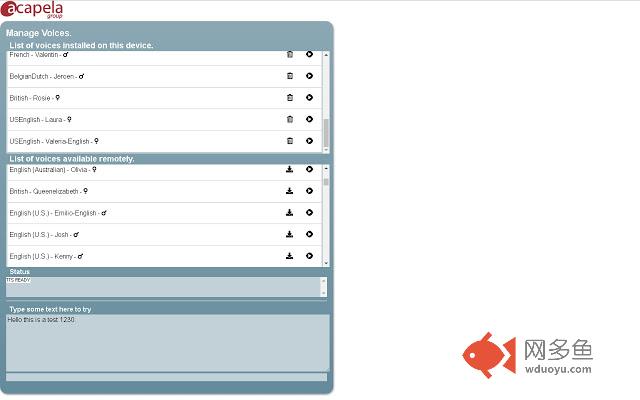
插件概述
Efficient, fast and high quality speech-synthesis engine.插件详情
IMPORTANT: This extension is only for Chromebook devices running Chrome OS.The extension is free, so you can try all of our voices in an online mode, but then you must buy voices to integrate them to your Chromebook system. Then you will be able to use them with any TTS-compatible application (like ChromeVox).
******** High Quality voices by Acapela Group ********
Add up to 100 voices in 30 languages to your Chromebook.
Voice capability is reinventing the way we all engage with devices and Acapela voices are helping to broaden the native voice offering on Chromebooks with another 30 languages and over 100 voices. The Acapela portfolio for Chromebooks includes authentic children voices as well as adult ones so that students can choose according to their age group and preferences, to feel fully comfortable with the voice they learn with.
Text-to-speech specifically helps individuals that read slowly or with difficulty, people who want feedback when writing or help with spotting errors when proof-reading, those who suffer visual stress when reading text on paper or on a screen or want to simultaneously see and hear. Immediate audio feedback improves word recognition, increases the ability to pay attention and remember information and helps students to recognize and fix errors in their own writing. The wide range of languages covered opens up language learning opportunities.
List of available languages: Arabic, Catalan, Czech, Danish, Dutch(Belgium), Dutch(NL), English(Australia), English(India), English(Scotland), English(UK), English(US), Faroese, Finnish, French, French(Canada), German, Greek, Italian, Norwegian, Polish, Portuguese, Portuguese (Brazil), Russian, Spanish, Spanish (North America), Swedish, Swedish(Gothenburg), Swedish(Scania), Swedish (Finland), Turkish.
******** Instructions ********
1/ Please check that you have a valid internet connection, as the app needs to contact our server to get the voice list.
2/ Open the extension options page.
3/ Browse the list of voices retrieved from our server.
4/ You can test any voice online. You can type your own text in the "Type some text here to try" area.
5/ The ‘Buy’ icon will open an in-app billing window, asking for confirmation of your purchase.
6/ After purchase, the voice will appear with a download icon. Click on it to start the installation. This requires an internet connection and may take some time. Beware that voice data are very big (100-200MB) so a strong and stable internet connection is recommended.
7/ After a successful installation, select the Acapela voice in your TTS-compatible application.
******** License and privacy ********
By downloading this software, you accept implicitly our licensing agreement: http://www.acapela-group.com/acapela-for-chrome/LicencingAgreement.html
其他信息
官方唯一标识:hfpbgbae****************ikgoadil
官方最后更新日期:2019年5月25日
分类:辅助工具
大小:1.45MiB
版本:1.0.1.59
语言:English (United States)
提供方:none
星级:3.6
插件下载
| 下载链接一 下载链接二 |
| Chrome插件离线安装教程 |
温馨提示
本站中的部份内容来源网络和网友发布,纯属个人收集并供大家交流学习参考之用,版权归版权原作者所有。
如果您发现网站上有侵犯您的知识产权的作品,请与我们取得联系,我们会及时修改或删除。
如果您觉得网多鱼对您有帮助,欢迎收藏我们 Ctrl+D。