3asyR
插件截图
插件概述
3asyR helps you enjoy reading! Try it for 15 days for free!插件详情
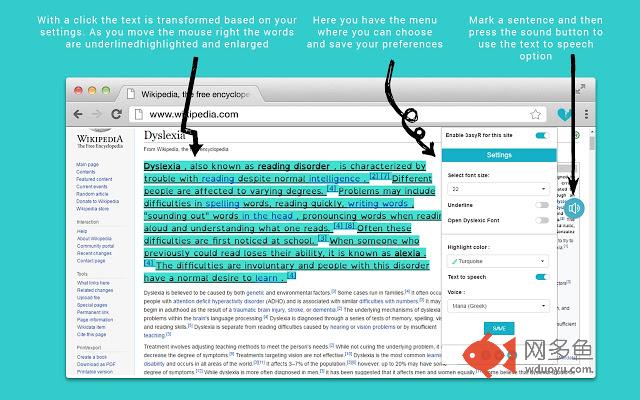
3asyR helps you have an easier online reading! Try it now for FREE for 15 days!3asyR is an interactive online tool that will help dyslexics and people with any kind of reading difficulty to read easier online by underlining, highlighting, changing font and hearing any online text, something that would help them keep the information they are interested in.
Get 3asyR here, launch Google Chrome and log in with your Gmail account. Open the page you would like to browse. You can find the 3asyR logo on the right side of the address bar and you click it to enable it. In the menu there are customized options to select and save.
1. Enable or disable 3asyR on every website with just a click
2. Underlining
3. Highlighting with 15 dyslexic friendly colors
4. Open Dyslexic Font
5. Font size: 18-24
6. Text to Speech
Ηow it works
You can see now 3asyR logo on the rights side of the address bar. Click on the logo to open menu and start reading! A click will underline the paragraph. Choose the first word of the paragraph you want to read and move right. The words appear highlighted and with an increased font helping you read faster. If the Text to Speech option is also activated the user can hear the underlined text just by clicking the sound button. Finally, the tool saves all changes automatically to the websites the user visits offering a customized experience and supports many languages. Alt + click clears all modifications and you can start all over.
More updates are coming your way so keep an eye and send us your feedback!
其他信息
官方唯一标识:knijgomk****************gmapmkca
官方最后更新日期:2018年5月29日
分类:辅助工具
大小:1.06MiB
版本:0.9925
语言:English
提供方:3asyr.com
星级:4.5
插件下载
| 下载链接一 下载链接二 |
| Chrome插件离线安装教程 |
温馨提示
本站中的部份内容来源网络和网友发布,纯属个人收集并供大家交流学习参考之用,版权归版权原作者所有。
如果您发现网站上有侵犯您的知识产权的作品,请与我们取得联系,我们会及时修改或删除。
如果您觉得网多鱼对您有帮助,欢迎收藏我们 Ctrl+D。